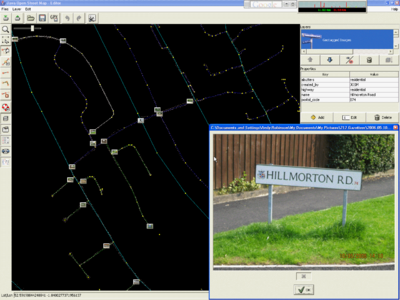
 JOSM Screenshot, showing the geo-tagged images feature. 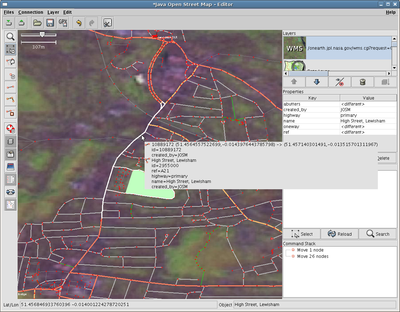 JOSM Screenshot with (outdated) landsat.jar and mappaint.jar plugin. JOSM is the "Java Open Street Map Editor" developed by Immanuel Scholz and currently maintained by Frederik Ramm. Its homepage is located at http://josm.openstreetmap.de/, where you can download the latest version (the nightly build, about 1MB). At least Java 8 is required.
?באיזה עורך להשתמש
There are other editors for OpenStreetMap data, like the Potlatch online editor or Merkaartor. So when should you use JOSM and when another editor? Well, JOSM is a feature-rich editor for the experienced OSM mapper. It requires some installation and configuration efforts. But if you intend to become a great OSM mapper, it's worth the time you need to get used to it. And if this sounds complicated: it's not if you are a bit familiar with computers.
You should use this offline editor if:
- You are going to change a large set of data
- You want to change data without having any immediate effect (try something out).
- You have taken photos during your track and want to display them on the position they were taken.
- You want to use an offline editor and going to edit an area, which you believe other people are currently changing. JOSM supports merging changes and conflict resolving from changed areas (remember to do a download prior every upload).
You probably don't want to use JOSM if:
- You just want to name this one street. Use the online editor.
- You don't want to install an application.
- You edit the map from behind a firewall that prevents JOSM working properly (e.g. from your place of work).
- Your machine doesn't match the Requirements below.
דרישות
על המחשב שלך JOSM דרישות המינימום להרצת
- (OS X 10.4 עובד היטב על JOSM .Mac OS X 10.3 אינו זמין עבור Java 1.5 ומעלה (לצערנו Java 1.5
- 256MB RAM
המלצות
- 1024x768 רזולוצית מסך
- 2D מתאם גרפי עם האצת
הורדה והתקנה
You need to have Java 1.5 installed on your computer in order to run JOSM. Unfortunately Java 1.5 is not available for Mac OS 10.3.x.
Then you simply need to download the JOSM jar file, which can be found on the Main site.
Various people started hacking on JOSM, so there are different flavours and plugins available. While the main JOSM trunk is at http://josm.openstreetmap.de/, you can download modified versions of JOSM, plugins or external tools that enhance JOSM.
Java התקנת
First of all you have to have Java installed on your system to be able to run JOSM:
Linux
- Install Java Runtime from here Java SE
Ubuntu
Debian "pure"
Note: If you have another JVM installed, either select the sun java vm by specifing its executeable (/usr/lib/jvm/java-6-sun/java) or
update the system configuration by invoking "update-java-alternatives -s java-6-sun"
Gentoo
Standard installation:
emerge josm
If you are interested in latest josm-development and plugins use the OpenStreetMap Gentoo Overlay. By using the "x86"-keyword you get a stable release, the "~x86"-keyword installs the svn-version.
There are many plugins already available as ebuilds. Look at https://svn.openstreetmap.org/applications/utils/gentoo/ for a complete list.
Windows
- Install Java Runtime from here: Java SE
Mac OS X
- Java 1.5 is already installed with OS X 10.4 or later.
JOSM הרחבות ל
A list of plugins is on the JOSM/Plugins page in this Wiki, and also in the JOSM Wiki. Plugins are installed as described below:
Linux & Mac OS X
- Install Java Runtime, if not already installed
- To install plugins, save them in
~/.josm/plugins (e.g. /home/$USER/.josm/plugins/wmsplugin.jar)
Windows
- Install Java Runtime, if not already installed.
- On the latest version of JOSM (April 2007), put the plugins in the directory is C:\Documents and Settings\your user name\Application Data\JOSM\plugins
JOSM הרצת
The jar file needs to be passed to the Java 1.5 runtime. This step is different to the various platforms:
Linux
Just type java -jar josm.jar in a shell. There are also some tutorial videos. One describes the steps to set up KDE for starting JOSM by clicking on the JAR file. Get the tutorials from one of the mirrors listed at openstreetmap.de.
Ubuntu users have a good tutorial at UbuntuForums.
If you need to use it from behind a proxy, you can tell it to the java runtime like java -Dhttp.proxyHost=192.168.1.1 -Dhttp.proxyPort=3128 -jar josm.jar, with the IP and port of your proxy.
If you need ipv6, you can tell it to the java runtime with -Djava.net.preferIPv6Addresses=true
e.g.
java -Djava.net.preferIPv6Addresses=true -Dhttp.proxyHost=proxy.ipv6.uni-leipzig.de -Dhttp.proxyPort=3128 -jar josm/josm-snapshot-xxx.jar
The proxy here is only mentioned because the openstreetmap-server doesn't support ipv6 yet.
Windows
Usually you can just double click on the josm.jar file to start JOSM.
In the rare case that this doesn't work, create a text file named start_JOSM.bat with a simple text editor, for example Notepad. Write the following line in the file:
java -jar josm.jar
Save this .bat file into the same directory where josm.jar is located. Now you can just double-click on the .bat file and JOSM will start up.
You can also set up a shortcut to the JOSM.jar file which allows the inclusion of additional parameters. I have the following as the short cut "Target" in my Start Menu which starts a control prompt window (useful to see progress of uploads/downloads), loads JOSM in its separate window, and assigns 512mb of memory for the process which dramatically speeds up operation when editing dense data. Change "path" to the full path of your josm-latest.jar file.
C:\WINDOWS\system32\java.exe -jar -Xmx512M "C:\path\josm-latest.jar"
Mac OS X systems
You need Mac OS 10.4 or better. 10.3 will not do the job. In 10.4.x, simply double click on the jar file and Java 1.5 should load the JOSM jar file. If you need to allocate more memory to JOSM (in order to edit larger files), the following script will help:
java -jar -Xmx256M -XX:MaxPermSize=256M josm-latest.jar
?איך להתחיל
- If you have a GPX tracklog file of the ways you want to map, start JOSM. Choose File → Open to select and load your track. JOSM will automatically fit the workspace to the bounding box of your track.
- If you don't have a GPX tracklog file then you may want to use data collected from other users. See Korea Mapping Guide
- If you want to play around while learning how to use JOSM without changing the data on the server then just don't upload (downloading is OK), delete the layers you changed, and then start over.
- Always download before editing even if you are using data stored on your own computer.
- To exchange data with the server ensure you have entered your username and passphrase in the preferences of JOSM. Your username is not your wiki username but the email address you used for registering.
- Now choose File → Download from OSM. In the following dialog ensure that the checkbox to get OSM data is enabled and press the OK button. Always download before uploading.
- If the track is too long, the server will refuse to send you the OSM data for that area. Zoom in a bit to restrict the request to a reasonable size.
- Wait a bit until all the data has been received. If there are existing ways of your area in the database, you will now see them in JOSM.
- Now start your editing session. Be careful when changing existing data, as streets and nodes can have lots of tags assigned.
- The JOSM manual is available online here, and these pages can also be accessed by pressing F1 from within JOSM. If you really mess things up simply delete the layers that have been changed before you do an upload and then start over.
- See here for a list of default shortcuts.
רמזים וטריקים
See also JOSM/Advanced Tricks (more tips for more experienced users)
- After installing a plugin, you have to visit the preferences where you can enable and disable each plugin individually
- For users new to OSM, it is recommended to use a presets file for easier tagging. Ask for one in the mailing list or User:SlowRider
- To see the ways in different colours and thicknesses, install the mappaint plugin
- If you do not have a wheelmouse, you can zoom in and out using the key combo Ctrl-. (period) and Ctrl-, (comma).
- If you mapped one lane of a motorway, find here a tool which creates the opposite lane for you.
Automatically Matching Photos to GPS traces
One of the problems when out mapping with a GPS is trying to keep accurate notes about the street names as you pass each junction. If you have a digital camera to take out with you, JOSM can help.
- take a photo of your GPS screen/display showing the time (on the GPS) when you start
As you are travelling around, take a picture at appropriate places/junctions/road signs. Then, when you get home with your completed GPS track uploaded into JOSM:
- In the "Layers" box, top right
- Right click on the GPS track layer, for the layer you have just uploaded. Note: you must do it from a layer you have just uploaded, and not from data that was downloaded from OSM, as that apparently no longer has a timestamp.
- Select "Import Images" (or possibly "import photos")
- Right click the photos layer,
- Sync the clocks using the (camera's timestamp on the) photo you took at the start (of the GPS screen/display clock)
- If you do not have a picture of the GPS for some reason, turn on the camera and GPS now. Work out the time difference between them. Now, subtract or add this to the time shown in the 'sync clocks' photo dialog.
JOSM הודעות שגיאה ב
Error while parsing. An error has occurred
The most likely cause of the above error is that the server is slow and has not sent the required response back to JOSM. If this occurs just try uploading the data again, and JOSM will resume from where it left off.
If you get error 412 precondition failed, it means that something changed on server in unexpected way. Try deleting affected objects.
JOSM seems to start okay, but the window is blank
If you have the fancy, compiz/beryl graphics stuff enabled, then this may happen. The solution is simple, add the following line to the user profile:
export AWT_TOOLKIT="MToolkit"
Newbie Notes
Here's a few notes from a beginner's (Parsingphase) first couple of days working on OSM, using the JOSM editor (on Mac OS X).
Mac-specific points
- "Installing" JOSM on OS X is a cinch — just download and double-click the .jar file.
- Use a two-button mouse with a scroll wheel — it makes life much easier. Right-dragging moves the map, the scrollwheel zooms.
- Otherwise, command-click (aka "Apple-click") does a right click, ctrl-arrows to move the map, and ctrl-, and ctrl-. to zoom.
- Because it starts with a dot, your ~/.josm directory will be invisible to the Finder. You either have to move the plugins into it from the command line, or open the folder using "Go to Folder..." ("Go" menu in the Finder).
- There's a Mac OS X look and feel under the Edit → Preferences menu; it doesn't actually change any functionality but it fits in ;)
Points for all platforms
- Get the "mappaint" plugin — it makes it far easier to see what's going on in your maps (and even work out where on earth you are), at the expense of slightly higher processor load on your machine (my PowerBook 12" copes fine).
- Upload and download small areas, frequently. The less time you've got unstored or unchecked changes, the lower the risk of conflict with other users.
- Always download an area before you start work on it, even if you have your own GPX data.
- Always download the area you are going to upload before doing so, to get any modifications made by other users and avoid overwriting data.
- When downloading an area you get all the data within the rectangular bounding box you choose, and also, where any way within that bounding box extends outside the box it is completely downloaded. It therefore becomes difficult to precisely know which areas you have downloaded full data for. If you check the "Draw boundaries of downloaded data" box (found in Display Preferences), a yellow rectangle is drawn around all the areas for which full data has been downloaded. Caution should be exercised when adding new data to areas outside these rectangles as it may duplicate already existing data, which you have not downloaded.
- A "small area" to start with might either be that from a short GPX track you've taken, or about a 1-km square around a known location. This equates to about 0.06° of latitude/longitude (give or take polar distortion), so enter an area about that size into the File → Download from OSM → Bounding Box.
- Rural areas with less detail might work better with larger areas — the 1-km recommendation is about right for a suburb of London.
- Once you're viewing an area in JOSM, at whatever zoom level, the JOSM download dialog box will default to the currently viewed area.
- It's very easy to select more than you expect to, particularly when making "ways". Open the "Current Selection" panel (Alt-e, fifth button up on the left) to keep an eye on what you've selected.
- Switch back to "select" mode regularly and click on nothing or type Ctrl-Shift-A to clear your select list.
?למה לא רואים את השינויים שביצעתי
- See Map Features for how to specify that your way is a road/railway etc, and what type. If you're not sure of the type (e.g. primary/secondary) be conservative and choose the lesser (e.g. secondary).
ראה גם
Related
קישורים חיצוניים
|


