JA:Tag:highway=motorway_link

 highway = motorway_link highway = motorway_link
|
 |
| 説明 |
|---|
自動車専用道路に連絡する接続道路(進入路 / ランプ) 
|
| OSM Cartoでのレンダリング |

|
| グループ: 道路 |
| 適用できる要素 |
    |
| 含まれる意味 |
| よく併用されるタグ |
|
| 関連項目 |
| 状態:事実上の標準 |
| ツール |


highway=motorway_link は highway=motorway の入口や出口の接続道路(ランプウェイ)に使います。通常は、自動車専用道路の通行制限が適用されます。アメリカ英語では On-ramps や Off-Ramps として知られています。
マッピング方法
訳注: この項目は右側通行の国での例を説明しています。
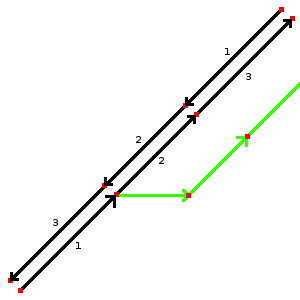
図1
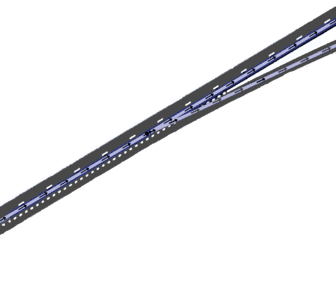
図2
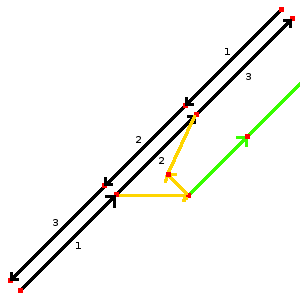
図3


自動車専用道路の接続道路をマッピングするのはとても簡単です。最初の例(図1)では2つの道路から1つの道路 (緑色) が分岐しているのがわかります。この緑色の道路には highway=motorway_link と oneway=yes をタグ付けしてください。図2のように、自動車専用道路の出口に緑色の道路が分岐するノードを置いてください。
2つ目の例(図3)はより複雑な接続を示しています。この例では自動車専用道路に出入りすることができるようになっています。これは2本のウェイ (オレンジ色) を作り、 highway=motorway_link と oneway=yes をそれぞれタグ付けします。方向を示す矢印を確認してください。接続道路の一部に物理的な分離(たとえば芝生)が存在しない場合は緑色の道路が必要です。この例では緑色のウェイに highway=motorway_link と oneway=no のタグを付けます。
| タグ | 説明 | 例 |
|---|---|---|
| ref=* | 存在する場合は参照番号(自動車専用道路から出口にかけてのルート) | 16 |
| oneway=* | 「yes」は一方通行を、「no」は両方向で通行可能であることを示す。#一方通行のタグ付け の注意を参照。 | yes |
| lanes=* | 車線の数 | 1 |
| maxspeed=* | 許可されている最高速度(km/h で) | 100 |
| destination=* | 接続道路の方向にある都市の名称。接続道路の看板に書かれている 都市の名称を使います。 | ロンドン |
一方通行のタグ付け
ほとんどの接続道路は一方通行であり、 oneway=yes のタグを付ける必要があります。両方向で通行可能な一部の特殊な接続道路には明示的に oneway=no のタグ付けをする必要があります。接続道路はほとんどが一方通行であるため、他の道路の分類とは異なる扱いをしていることに注意してください。いくつかのツールでは oneway=no のタグがない限り、暗黙的に oneway=yes と解釈されるため(どちらにせよ)明示的なタグ付けは重要となります。
自動車専用道路のジャンクションの識別
自動車専用道路の出口では、出口の番号または名称を追加します。
- highway=motorway_junction ジャンクション(自動車専用道路から他の自動車専用道路へ)またはインターチェンジ(自動車専用道路から一般道路)への出口を示します。タグ ref=* と name=* を使って出口の番号(例:米国、英国、スペイン)や出口の名称(例:フランス、ドイツ、イタリア)を割り当てる必要があります。タグは車道へ通じる道 / 自動車専用道路の車道 / 自動車専用道路そのものと出口に向かう接続道路のウェイが共有されているノードに付けられます。
その他の状況
並行する車道
(自動車専用道路に属する)側道や、物理的に分離された登坂車線、方向が変わる車線などのような、自動車専用道路に並行する道路は motorway_link でタグ付けしてください。 trunk などに分類されている主要道路の場合は、その種別の _link を代わりに使用してください。
異なる種類間の道路にある接続道路
自動車専用道路から一般道路につながっている道路で、もっぱら自動車専用道路との出入りに通行する区間は、 motorway_link とタグ付けしてください。自動車専用道路から一般道路につながる道路であっても、自動車専用道路を使わない交通も通行する場合は、 motorway_link 未満、ふつうは一般道路の *_link としてタグ付けしてください。
自動車専用道路のサービスエリア
motorway_link は入口・出口のランプウェイでの使用に加えて、自動車専用道路の外にある自動車専用道路のサービスエリアへのランプウェイにも使用されます。この場合、サービスエリアに向かう motorway_link には自動車専用道路の規制(たとえば、歩行者禁止)が適用されます。英国ではこれは標識に示されています。同様に、サービスエリアからの退出路は自動車専用道路と同様の規制が始まる地点から motorway_link にする必要があります。
関連項目
- highway=motorway_junction
- JA:接続道路
- Lane_assist - turn=* と destination=* を使った車線案内のベストプラクティス
- Talk:Lane assist/Examples/Motorway exit#Setting the split (location of the motorway junction node)
- Proposed_features/Motorway_link_obligatory_oneway
| ||||||||||||||||||||||||||||||