Key:tunnel

 tunnel tunnel
|
 |
| Description |
|---|
A tunnel is an underground passageway built for a road or similar. 
|
| Group: placement |
| Used on these elements |
    |
| Documented values: 5 |
| Implies |
| Useful combination |
|
| Status: de facto |
| Tools for this tag |
|


tunnel=* is used for roads, railway line, canals, etc. that run in a  tunnel.
For some grade separated crossings it may however be debatable if the lower way is in the tunnel or if the upper way is on a bridge=*. In general, if the lower way is long and surrounded by earth it is almost certainly a tunnel; and if the lower way is short and the upper way is supported on concrete, brick on metal pillars and beams then that is almost certainly a bridge. There are however situations where it is a matter of personal judgement, but it is preferred to either tag the lower way as tunnel or the upper way as a bridge, but not both.
For covered passages which are open on one side along the way, use covered=* in place of tunnel=* (e.g. covered=arcade or covered=colonnade). One exception are landslide/avalanche protectors on mountain roads, which are tagged as tunnel=avalanche_protector.
Where the water from a smaller stream, drain, or even cattle crossing, passes under a way structure or a building, consider using tunnel=culvert in place of the tunnel=yes used for accessible and larger tunnels for roads, railways, etc.
When the waterway=* runs underground for a considerable distance, you can use tunnel=flooded especially when the duct isn't designed to be safely accessible in operation or man_made=pipeline for sections built with tube assemblies.
Power cables (power=cable) or pipelines (man_made=pipeline) buried underground should not be tagged as tunnels. The location of a buried cable may optionally be tagged as location=underground or location=underwater. However, if the cable or pipeline is located inside a self-supporting tunnel, it may be tagged as tunnel=yes. Such dedicated utilities tunnels are sometimes found in large cities.
How to map

- Split the way in question at the points were the tunnel starts and ends and add the tunnel tag. It is best to avoid having a tunnel continue to a junction that is not in a tunnel by splitting the way prior to the junction.
- Most tunnels should be tagged with layer=-1 or another suitable negative value (exception: tunnel=building_passage). For metros/subways or other very long ways, it is often convenient to use layer=-2 to accommodate underground passages for pedestrians between the tunnel and the surface.
- Where the approach to the tunnel is in a cutting, this can be identified with cutting=yes. Note that a layer=* tag is not desired on a cutting or embankment unless there are several layers of objects that need to be differentiated.
tunnel=building_passage should normally not have a layer assigned as there is no clear above/below relation to the building, but a layer may be required when there are several layers of building passages.
It may also be useful to add maxheight=* and maxwidth=*, if there are publicised restrictions and use access=*, if there are restrictions on use by certain classes of vehicle or user.
If the tunnel has a name this can be specified using tunnel:name=* (14,060 uses by 1197 editors at 2021-02-28) although it should be clear that this is still an indirect way of mapping "a tunnel" (it is a property of the feature which is in the tunnel and refers to a tunnel which may be mapped as a distinct object as well). There is still some debate on the best method to map the name of tunnels and how to represent the tunnel as its own object.
lit=* can be included to provide information about any lighting in the tunnel (or not).
Values
The following values are now considered in OpenStreetMap according to classification upside:
Additionally, the following values are in use with waterways:
Rendering
tunnel=yes, tunnel=building_passage, and covered=yes are rendered by the default OpenStreetMap styling.
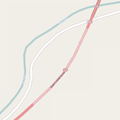
OSM Carto draws tunnels on highways with dotted outlines and a lighter fill colour for the road and with curved colour transitions on tunnel entrances.


Possible tagging mistakes
See also
- covered=*
- highway=corridor
- Proposed features/building passage – accepted proposal
- Relations/Proposed/Bridges and Tunnels – group multiple tunnel elements with a relation
- Proposed features/man made=tunnel – simple way of indicating the outline of a tunnel and grouping together all features for that tunnel