User:Bielawski/Sandbox/Potlatch beginner
Potlatch, the Online Editor
For a quick start, try watching these video screencasts on how to use OSM and Potlatch.

The online editor is a Flash application called Potlatch. To get to the Potlatch editing page, head to main page and click on 'Edit' along the top.
IMPORTANT If the exclamation mark (!) appears at the bottom left, click on it and select "Try again" to save your changes. Otherwise, you will lose them!
Starting Potlatch
When you start Potlatch, you will see two modes to choose from:
- Edit with save – This is recommended for beginners. In this mode, your work will not be saved until you click Save in the bottom-right corner.
- Edit live – In this mode, all edits are saved directly to the database as you make them. The status line in the top-right corner shows when data is being saved.
Loading data to trace from
To load all GPS tracks in the current view, click the GPS icon (the middle one) in the bottom-left. To choose imagery to trace from, click the checkmark icon in the bottom-left and choose an image source.
Basic interactions
- To move around, drag from an empty space.
- To zoom, use the blue buttons in the top-left corner.
- To select an object, click it.
- To deselect an object, click in an empty space.
Working with nodes
To create a single node, double-click in an empty space. To move a node, drag it. To delete a node, select it and press Delete.
Working with ways
Creating a way
- Click in an empty space to place the starting node of the way. You can also use an existing node to start a way by Shift-clicking the node.
- A red dot appears and a black straight line follows the cursor.

- A red dot appears and a black straight line follows the cursor.
- For each node to add to it, click anywhere. A yellow halo surrounds the way, and each node is marked in red. Clicking on another way makes the ways intersect at that position, and clicking on another node adds that node to the way instead of creating a new node.
- If you make a mistake, press Backspace.
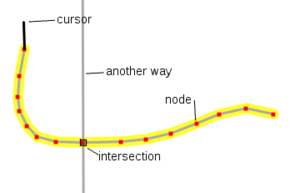
- To end a way, either click the last node that you added, or press Enter. Pressing Esc will delete the way.
- If you are creating an area, click the node that you started with to close it.
- If the area has a hole in it, use Relation:multipolygon.
- If you are creating an area, click the node that you started with to close it.


Editing a way
- To extend a way, select it, then click one of its end nodes. Continue as if drawing a new way.
- To add a node into a way, select the way and Shift-click where you want the node to be.
- To split a way into two, select the way, then select the node, then click the scissors icon in the bottom left.
- The arrow icon in the bottom left shows the general direction of the way. This is important for one way streets and coastlines. Click it to reverse the way.
- To join two ways, first make sure that they share an end node. Then, select one way, then Shift-click the second one.
Notes
Note that you are editing on live data, please be careful. To ensure data is added to OSM correctly and well, JOSM users are advised on a few things that are also important to people wishing to use Potlatch. In addition to this, in Potlatch, it is important to allow data to load, before presuming it isn't there. A relatively common mistake is to duplicate data by adding, before it's clear what's already been added.
Some tips
- At the bottom left of the editing page, The centre bottom button allows you to view gps data. Short cut 'G'. Be sure to check if something is where it is for a reason before shifting it to a seemingly better location.
- Shift click anywhere on a line to add a point.
- Click on a line, then click on the point on the end of the line to select that point.
- Shift click on a point to start a new line. This is helpful for joining roads.
- To delete a way, select the line, then select a point as above, and press DELETE.
- To copy attributes from a previously selected way, press R. This is good for adding speed limits to a way that someone else has added previously, e.g. "maxspeed=60".
- To extend a way, select a line segment of this way, shift click the point from which you like to extend then click for each point to go ahead with the route of the way. Set new points or snap a point of an existing way by moving over the point (it will be highlighted blue). To finish a way press ENTER. Repeat the attributes from the previously selected way as described above.
- Select a point to drag it. Save the changes as described above.
- Press c to add a comment to your editing session, this can tell others who look in history view on the main map what you've changed.
Read more here: Potlatch/Primer.