Columbus

Columbus V-900
The Columbus V-900 is a GPS receiver and logger with voice recording function. It is also known as Visiontac VGPS-900.
Logs are stored on Secure Digital microSD cards with a capacity of up to 2GB. Format of the track logs is a kind of comma-separated value (CSV) text file with fixed-length \x0-terminated fields. Audio recordings are stored as WAV files.

| Columbus V-900 | |||||
|---|---|---|---|---|---|
| Description | Logger; Receiver | ||||
| GNSS | 51 channels chipset: MTK ARM augmentation: WAAS;egnos DOP: hdop;vdop;pdop | ||||
| Memory | Internal: 32MB (25.000.000 max logging). External: ? microSD (2GB). | ||||
| Integrated equipment | Microphone | ||||
| Connectivity | Bluetooth | ||||
| Features |
| ||||
| Price | £55 | ||||
| Pros |
| ||||
| Cons |
| ||||
| Notes |
Bugs: In the southern hemisphere the device fails to find a GPS position. In reality, it makes a fix, logs a few points but then throws away the solution to start over. The bug is recognized by the manufacturer and units delivered after August 2009 should not have this problem any more. | ||||

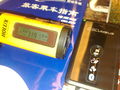
Columbus V-900 at 319 km/h in a high-speed train, along with Holux M-241
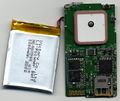
Visiontac VGPS-900 revision 2.0 PCB side A


Software
TimeAlbum
TimeAlbum, the software supplied by the manufacturer is written in Java and should at least run on Linux, Microsoft Windows and Mac OS X. It features export of logs to KMZ (zipped KML) format.
BT747
BT747 is able to read and convert this CSV dialect to GPX, KML/KMZ and other formats, including a neat and efficient HTML format that shows your track fast on Google Maps (and OSM data) in any browser? The fastest way is to drag and drop your CSV files to BT747 and a few clicks further your data is exported into a GPX format that is optimized for OSM.
GPSBabel
GPSBabel supports reading waypoints and tracks directly from a Columbus/Visiontac V900 CSV file. The GPSBabel documentation for the Columbus/Visiontac V900 format is available: [1]. For example, to convert from a Columbus/Visiontac V900 CSV file to GPX you can use the command:
gpsbabel -i v900 -f v900_input.CSV -o gpx -F v900_output.gpx
Alternatively, a historical method using a shell script has been used. While gpsbabel is able to convert CSV files to GPX and other formats, it is convenient to do some preprocessing of the CSV log.
v9csv2gpx.sh is s script which does this:
#/bin/sh
#
# Convert Visiontac VGPS-900 log file to GPX
#
# 2009-02-08
# mip@rootcamp.net
#

SED='/bin/sed'
GREP='/bin/grep'
GPSBABEL='/usr/bin/gpsbabel'

for FILE in $* ; do
    if [ -f "${FILE}" ] ; then
        TMPFILE1=`mktemp`
        TMPFILE2=`mktemp`
        TMPFILE3=`mktemp`

        OUTFILE=`echo ${FILE} | ${SED} -e 's/\.csv/.gpx/i'`

        # Reformat CSV into something understandable by gpsbabel unicsv
        # moving E/W,N/S from lon/lat fields into separate ones,
        # renaming of audio references to proper file names,
        # reformatting of date and time fields
        ${SED} -n -e ' s/\x0//g;
                    1s/INDEX/NAME/;
                    1s/TAG/ICON/;
                    1s# N/S#,N/S#;1s# E/W#,E/W#;
                    1s/VOX/URL/p;
                    1d;s/\([NSEW]\{1,1\}\),/,\1,/g;
                    s/ ,/,/g;
                    s/VOX\([0-9]*\)/VOX\1.WAV/g;
                    s/,\([VCT]\{1,1\}\),\([0-9]\{2,2\}\)\([0-9]\{2,2\}\)\([0-9]\{2,2\}\),\([0-9]\{2,2\}\)\([0-9]\{2,2\}\)\([0-9]\{2,2\}\)/,\1,20\2-\3-\4,\5:\6:\7/p' \
                    "${FILE}" > ${TMPFILE1}

        # Get trackpoints and convert to gpx
        ${GREP} -E ',T,|URL' ${TMPFILE1} | ${GPSBABEL} -i unicsv -f - -x transform,trk=wpt,del -o gpx -F ${TMPFILE2}

        # Get waypoints and convert to gpx
        ${GREP} -v ',T,' ${TMPFILE1} | ${GPSBABEL} -i unicsv -f - -o gpx -F ${TMPFILE3}

        # Merge track and waypoints into single gpx, substituting url tag with link tag as known by JOSM
        ${GPSBABEL} -i gpx -f ${TMPFILE2} -i gpx -f ${TMPFILE3} -o gpx -F - | ${SED} -e 's#<\(/\{0,1\}\)url>#<\1link>#g;' > "${OUTFILE}"

        rm -f ${TMPFILE1}
        rm -f ${TMPFILE2}
        rm -f ${TMPFILE3}
    fi
done
JOSM Plugin
Oliver Wieland wrote a JOSM plugin to import CSV files.
Columbus to GPX
Russ Nelson's Python program to turn a Columbus pseudo-CSV into a GPX file is in OSM's SVN: https://svn.openstreetmap.org/applications/utils/gps-tracks/columbus-to-gpx/
Misc
Wang Chun wrote a simple Perl utility to convert from CSV to GPX format: columbus.pl
Ludo released VGPS-900toGPX which runs on Mac OS X.
Istap built a nice application using Nokia's Qt SDK called v900togpx (runs on Windows/Linux and Mac OS X). This tool stores the lon and lat in the GPX output in reverse order for V990 CSV files.
Columbus V-990
Columbus V-990 is the next generation of the V-900.