NL:OSM2World

| OSM2World | |
|---|---|
 | |
| Auteur: | Tobias Knerr |
| Licentie: | GNU Lesser General Public License (kosteloos) |
| Platforms: | Windows, Linux, en macOS |
| Versie: | 0.1.8 (2011-11-09) |
| Taal: | Engels |
| Website: | http://osm2world.org |
| Broncode: | https://code.launchpad.net/osm2world |
| Programmeertaal: | Java |
|
Genereert een 3D-model van de aarde met behulp van OSM-gegevens. | |
OSM2World (osm2world.org) is een programma dat een driedimensionaal model van de wereld maakt, gebaseerd op gegevens uit OpenStreetMap. Het model kan vervolgens in enkele formaten worden geëxporteerd.
Ondersteunde bestandsformaten
Op dit moment worden Wavefront .obj-bestanden, .pov-bestanden voor de raytracer POVRay, directe output met JOGL (de OpenGL-bibliotheek voor Java) en .png-afbeeldingen gegenereerd uit de JOGL-output ondersteund. Indien nodig kunnen andere formaten worden toegevoegd.
Het gebruik van OSM2World

Installatie
OSM2World heeft een Java Runtime Environment, version 1.6 of hoger, nodig. Gebruikt u JOSM, dan hebt u er waarschijnlijk al een.
Als u Java gereed heeft, ga dan naar osm2world.org/download en download het ZIP-archief met het gecompileerde programma. Pak het ergens uit op uw computer.
Grafische interface

Run OSM2World from the command line using the batch/script that is appropriate for your system. It allows you to open OSM data files and navigate through the models:
- left mouse button moves the camera position
- right mouse button rotates the camera direction
- mouse wheel moves the camera closer to or away from the ground
Keyboard navigation is available as an alternative. Various debug layers can be displayed, and export to .png, .pov and .obj is possible. Be warned that the visualization is low quality and rather performance hungry at the moment, it primarily serves debugging purposes.
Command line interface
This is a short documentation of the OSM2World command line. Please understand that the command line syntax is not yet stable and is likely to change in the future.
Input and output

-i/--input <file>.osm, .osm.gz or .osm.bz2 input file-o/--output <file> ...one or more output files. Filename extensions determine output file format. Available are .obj, .pov and .png files.--resolution <horiz_res>,<vert_res>size in pixels for resolution-dependent outputs (.png)
Camera
Defining a camera and projection for viewing the generated scene is required for .png output. It is optional (but recommended) for .pov files. You can either use orthographic or perspective projection. The available parameters for defining the camera depend on this choice.
Orthographic view:
--oview.angle <angle_deg>downwards angle of orthographic view in degrees; defaults to 30. Only works for angles > 0° and < 90°.--oview.from <N/E/S/W>cardinal direction from which the orthographic view is rendered; defaults to south (S)- there are two alternatives for defining the bounds of the rectangle (in the elevation=0 plane) that is projected onto the viewing plane:
--oview.bbox <lat>,<lon> <lat>,<lon> ...list of coordinates; the closest bounds containing all these coordinates will be used--oview.tiles <zoom>,<tileX>,<tileY> ...one or more tiles (defined using zoom level and x/y coordinate); the closest bounds containing all these tiles will be used
Perspective view:
--pview.pos <lat>,<lon>,<ele>camera position for perspective view--pview.lookAt <lat>,<lon>,<ele>look-at for perspective view--pview.aspect <value>aspect ratio (width / height) for perspective view; defaults to aspect ratio of resolution--pview.fovy <angle_deg>vertical field of view angle for perspective view, in degrees; defaults to 45.
Logging
--performancePrintprints execution times to the command line after each phase of conversion--performanceTable <file>appends execution times to a file after the conversion, formatted as a line of a plaintext table
Other parameters

--config <file>properties file with additional parameters (see OSM2World/Configuration file). Can be used for both the graphical and command line interfaces.--guistarts the #Graphical interface--helpprints a short description of the available command line parameters--versionprints the current version of OSM2World
If you use --gui, --help or --version, OSM2World will not perform a conversion - it will execute this single action instead.
Parameter files
--parameterFile <file>a file containing one set of parameters per line.
If you want to perform multiple conversions, you can write the parameters (without program name) into a file and pass it as an argument to OSM2World. Lines starting with # will be ignored.
The main advantage is that conversions will be grouped if possible - i.e. if they have the same --input and --config parameters. For example, you can quickly render the same data from different perspectives.
Examples
./osm2world -i example.osm -o image.png --pview.pos +50.2607,+10.965,+110.0 --pview.lookAt 50.2623367,10.9640632,0
Writes an OpenGL rendering of the 3D model generated from example.osm to image.png. The rendering uses a perspective projection, with the defined coordinates for camera position and look at.
./osm2world -i example.osm -o tileexample.pov
Creates a 3D model from example.osm and exports it to the POVRay file example.pov. The POVRay file will not contain a camera definition, so you have to set it manually before feeding example.pov to POVRay.
./osm2world -i example.osm -o tileexample.pov --oview.tiles 12,2186,1312 12,2186,1313
Creates a 3D model from example.osm and exports it to the POVRay file tileexample.pov. The POVRay file will also contain the necessary camera definition for an orthographic view. It will be chosen to show the smallest possible bounding box that includes the two tiles 2186,1312 and 2186,1313 (both zoom 12). The camera looks at that area from the south. No --oview.angle parameter is given, so it defaults to 30 degrees. This angle is particularly interesting as it means that two "normal" square tiles will fit exactly into one square orthographic tile (that's because sin(30°)=0.5).
Library interface
You can use OSM2World as a Java library. The preferred way to do this is by using the ConversionFacade class that wraps the whole conversion into a single method call. It lets you provide input data and set output targets. You can also choose which kinds of world objects you want to be created and provide fine-tuning parameters - or you can just stick to the defaults, of course. Have a look at the javadoc.
If you need more functionality, don't understand the code, etc., just ask!
Plans and limitations
Elevation data
Elevation calculation in OSM2World is currently very fragile and deactivated by default, but exists as an experimental option. The calculation is intended to use object attributes (such as incline=*, layer=*, tunnel=* and bridge=*) and absolute elevation (ele=*, either from OSM itself or converted from sources such as SRTM or OpenDEM).
Troubleshooting
- It's recommended to load only small maps, especially using the graphical interface. There are several places in OSM2World where very inefficient algorithm placeholders are used.
- If OSM2World runs out of RAM, you can edit the start scripts and raise the
-Xmxparameter. - If you have any other questions, use the talk page or take part in relevant discussions in forums or mailing lists. You can also contact User:Tordanik directly.
Links and resources
Documentation
- javadoc
- version change history
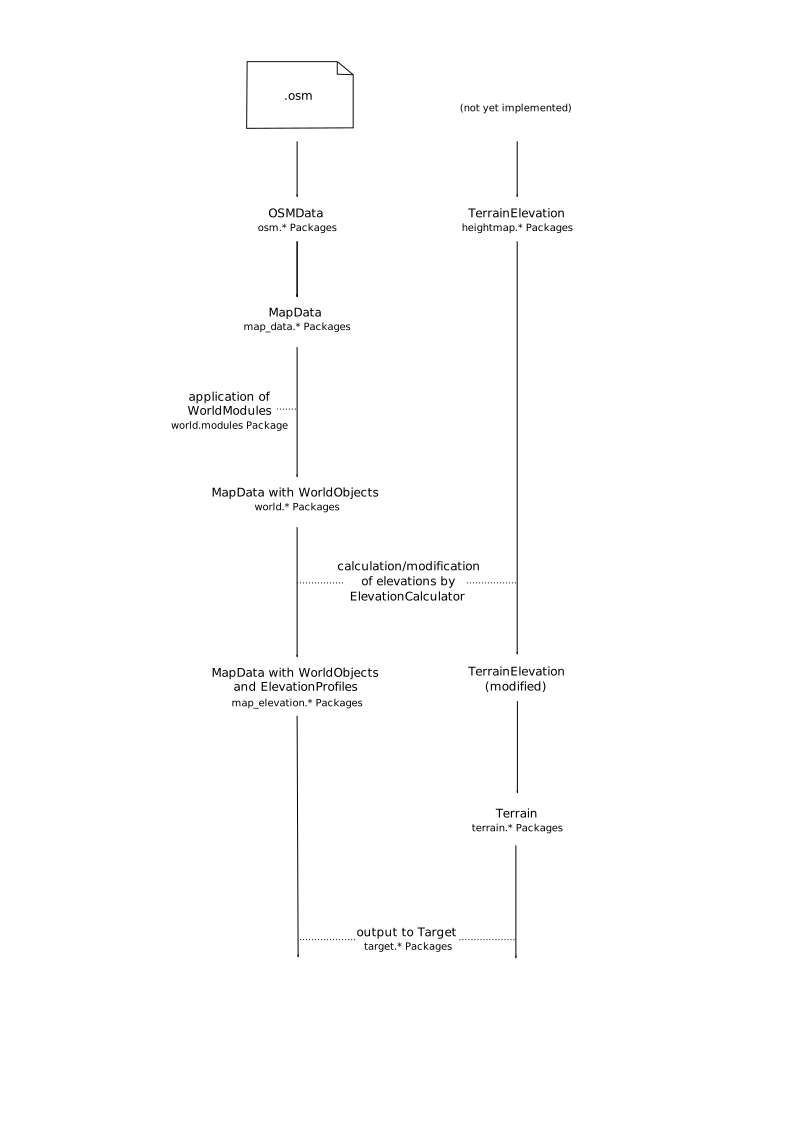
- high-level overview diagram as svg, pdf
Project pages
- Website with download archive and screenshots
- Launchpad project