NaviGPS
As at December 2018 it looks like these are all discontinued and no longer available.


There are now quite a few OpenStreetMap users who own NaviGPS units. This is an owners page containing useful notes for these people. The different Names for this Device range from NaviGPS, NaviGPS-BT, Navi GT-11/BGT-11 (obsolete), Genie GT-31/BGT-31, Amaryllo, JJ-Connect Navigator 101/101BT. It was originally made by Scytex but the product and its engineering team have now transferred to Locosys. If you want to buy one, read the Merchandise page to give OSM a 10% donation for free. Also see NaviGPS for Linux.
Quick Start
This guide is for anyone who has never used a NaviGPS before and just wants to go out and record some tracks (assumes you have a memory card installed).
- If NaviGPS is brand new read the Setting Up section.
- Press the small button for two seconds to switch it on.
- Check that the messages CARD FOUND and NEW FILE come up.
- Hold it out in the sun, with a good view of the sky, for two or three minutes to get a fix. It will bleep and the light will flash when it has a fix. There will be a small
3Dor2Dicon in the top right of the screen when it has a fix. Remain stationary until you get a fix. - Go and make some tracks.
- Ensure that the unit always has a good view of the sky.
- If you lose your fix because of a tunnel or heavy tree cover, stop and wait for the fix to be regained once you have clear sky.
- To record a waypoint press and hold down the big button. The waypoint number will be displayed for a second or two.
- Write down the waypoint number and the name of the street or point of interest.
- If you are recording the name of a street, write something like "turning left into start of High Street" or "Bridge Road becomes Water Lane at this point".
- If you are recording a point of interest note the location relative to where the GPS is. "St Peter's Church on left hand side about 50m from the road" or "Pied Piper pub on right hand side".
- To switch off the unit press the small button and hold it down for several seconds.
- Once you have the NMEA format .TXT files from the SD card, you will need to convert the files to GPX for use with Josm or Openstreetmap or gpsbabel. Check out the NMEA page for instructions.
- The Navilink software (for Windows) captures your tracks and waypoints to a PC in NMEA, GPX and Google Earth KML format.
- The Amaryllo site has a good Getting Started guide.
Memory Cards
Not all memory cards work in a NaviGPS. The Locosys website states that the unit provides a 2.8 V supply to the card, so any card with an equal or lower minimum voltage should work.
Known to work
The following cards are known to work:
- Crucial 2Gb (CT2GBSD)
- Impact branded 256Mb
- Integral 2GB maybe -- needs more testing
- Kingston Technology (Toshiba) 512MB (tested in GT-31)
- Kingston Technology 1Gb 3.3V (P779074)
- Kingston Ultimate 133x 512MB
- Panasonic branded 16Mb
- PrèzMate 2Gb (U2660P8)
- SanDisk Ultra II - 1Gb/2Gb
- SanDisk Ultra II Plus (with integral USB connector) - 512Mb
- SanDisk Ultra II Plus (with integral USB connector) - 1.0Gb
- SanDisk 256Mb, 512Mb, 1Gb
- Transcend 2 GB (tested in GT-31; needs firmware update GT31_FW_V1.3B1123T or later)
Known to NOT work
- "Canon" branded 32Mb
- "Jessops" branded 512Mb (corrupts see below)
- "Palm" branded 128Mb (corrupts see below)
- SanDisk TransFlash 32MB micro-SD with SanDisk microSD/TransFlash to SD Adapter
- Kingston Technology 2GB Secure Digital (SD) Card
- NCP SD 1Gb
- Nokia miniSD 512Mb (with converter)
- Transcend 1GB SD (will appear to record data, but the NMEA track points will all be zero)
Troubleshooting
- The NaviGPS expects a FAT-16 file system so don't expect cards with more than 2GB to work.
- Waypoints (as opposed to tracks) are stored in proprietary .BIN format. They can be converted to other formats using the Windows software supplied, GPSBabel or (on Linux) with navilink.pl.
- The NaviGPS is a bit fussy about the formatting of the file system. If you have problems, try reformatting the card using the NaviGPS's built-in memory card format command. Cards formatted using Linux seem to be more prone to problems (try formatting the entire card without a partition table because that's how the NaviGPS formats it).
- There have been a couple of reported cases where the unit has appeared to work fine, but has not created any track log files. Try running chkdsk. The files might be there but just not visible in the file system directory.
- As the data on the SD card is just NMEA ASCII text, it can be converted to GPX (or any other format) with GPSBabel or the NaviLink II software.
- Some PDAs running Windows Mobile will automatically wipe a NaviGPS-formatted SD card on insertion, no questions asked. Test this before you have important data (the above comment about extracting data in Linux will get it back again). The issue with this may be using a card that's not seen a Windows environment before it's used. If a card is used in a Windows Mobile PDA and then put back in the NaviGPS, all appears to be fine and you don't appear to lose your data when it's next inserted in the PDA. Someone should verify this is the case and add a comment here please.
- If the unit turns off randomly, especially if it also corrupts files, then it probably does not like your SD card. Try to get one of the 'known good' cards listed above.
- If the unit appears to be completely locked, there is a chance that it doesn't like your memory card either. This tends to happen right after it gets a fix, and consistently. There's two ways to get it out of this condition: sit out the batteries, or (probably) void your warranty by opening it up and disconnecting the battery. The last option is very easy, though (GT-31 and BGT-31 models, might be different on others):
- Unscrew five screws in back and two screws under the connector/memory card cover.
- Remove front.
- Unscrew one screw that keeps the circuit board in place, and lift up the board.
- Now, unplug the pair of wires that goes from the battery to the circuit board, and then it plug it back in.
- Check that the rubber waterproofing seal is neatly tucked into its slot all the way round the case before tightening the screws.
Disassembled BGT-31
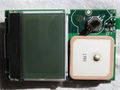
Disassembled BGT-31, front.
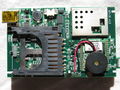
Disassembled BGT-31, back.
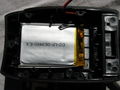
Disassembled BGT-31, battery.


Addenda
This was provided in an email from Scytex support):
- INDOORS – If the system can't find a GPS signal, it will pop up INDOORS asking if you are somewhere the sky is blocked by a roof or something. If you answer with NO, the system will pop up TRAVEL LONG...
- TRAVEL LONG – The system maintains the database of the last GPS satellites received before turning off the power. When you turn on the power again, the system compares the database with the new GPS signals received, so that the system can fix very quickly. If you travel far away from the position (a few hundred miles in general) and the system can't find the same GPS signals as in the database, it will pop up TRAVEL LONG. If you press YES, the system will re-initialise the database, indicating COLD START. You generally want to press NO.
- NAVIGATION / SPORTS – A unique feature to screen out the position drafting. When set to SPORTS (under FUNCTION in the Settings), the system will fix only when the HDOP value is less than 4. Under NAVIGATION, the system will fix when HDOP value less than 10. However, it is recommended to set to SPORTS only when under a very clear sky.
- Turning On/Off Backlight using Power/ESC button – Pressing Power/ESC button at the Main Screen to turn on the backlight will override the setting under the SETTINGS page. You will have to go back to the SETTINGS page to select the BACKLIGHT TIME again, then the backlight will turn off automatically again.
- (this one from an e-mail from Locosys support) - to use the firmware update software, you can set the unit to any page but Navlink page (i.e. the opposite to what you need to do for connecting the Navlink software. Doh!)
- BLUETOOTH - When setting up the bluetooth link with a mobile phone, the default passcode is 0000.
Setting Up
The following notes relate to setting up a NaviGPS from new for use in making tracklogs:
General
- Upgrade firmware to the latest stable version. Newer firmware provides extra features and fixes for bugs. See the Locosys Support page. Unstable firmware version numbers end in a 'T'. These are not recommended for general use.
- Backlight timeout. By default when you use the unit the backlight comes on automatically and goes off after 10 seconds or so. However, pressing the on button can also switch on the backlight permanently - which helps to drain the batteries. If you set the BACKLIGHT TIME to OFF then it is obvious when you have accidentally switched it on.
- Track only when you've got a fix Set [MEMORY CARD]/[LOG SWITCH] to [ON-FIX]. Without this, if you lose signal during a track, you'll get an annoying zigzag in the track back to 0.00000 lat, 0.00000 long, which you'll have to manually edit out before uploading.
- Tracklog interval should be set to 1 second. Nothing else is good enough for our purposes.
- Note that, if you are using an SD card, you can set the tracklog and SD NMEA log intervals (see below) independently. Setting the tracklog interval to COMPACT whilst leaving SD NMEA log interval at 1 second will allow you more time during which tracks are displayed on screen, whilst recording GPS data at 1 second intervals to the SD card.
- Differential correction. Set the DGPS SOURCE to SBAS. Set the POWER MODE to NORMAL, otherwise DGPS is disabled.
- Minimum Speed. Optional, but helpful: set MIN SPEED to a low value to prevent the unit from logging lots of points when you're stationary. eg. 1km/h
Memory Card setup
- If you are using an SD memory card, format it using NaviGPS's built-in format command (don't know for sure that this solves any problems - but does eliminate problems from FAT-32 formatted cards etc).
- Set the logging interval to 1 second for all nmea messages.
Memory Card corruption
If you've arrived home to find that your SD card can't be read by your computer, there is a chance you can recover some files using PhotoRec. PhotoRec will scan through the card, ignoring the partition information, looking for file headers. It will produce some files that have been renamed with numbers (not original file names). A program like grep (for GNU/Linux) might help you sift through to find the resulting files. Try "grep 'dd,mm,yy' *txt" where dd, mm and yy are replaced by the day, month & year you're looking for respectively.
Such corruption has been known to occur using development firmware (B0608T) on a known good card model. Please stick to stable/formal firmware releases to avoid disappointment.
Retrieving data
There are several ways to obtain data from these devices.
Using NMEA files from an SD card
This usually is the easiest way. Set the device to log to files, then retrieve those files from the SD card. To convert them to GPX, use gpsbabel:
for i in *.TXT; do gpsbabel -i nmea -f $i -o gpx -F $i.gpx; done
Write internal datalog to SD card
If not using card to directly store data, or in case card gets corrupted, you can copy internal log contents to a card. This uses binary format. To convert such a file to GPS, again, use gpsbabel:
gpsbabel -t -i sbp -f FILE.SBP -o gpx -F out.gpx; cat out.gpx
Retrieve internal datalog directly
Additionally, you can retrieve internal datalog contents without using SD card. Again, gpsbabel comes to help...
gpsbabel -t -i navilink,datalog -f /dev/ttyUSBX -o gpx -F out3.gpx
Note that datalog part is important, otherwise only partial data is retrieved.
Make sure to use whichever ttyUSB device your device sits on. lsusb will list it as Prolific Technology, Inc. PL2303 Serial Port.
Updating Firmware
Under GNU/Linux
The firmware update software for Windows can be successfully run under GNU/Linux via Wine (you need to configure the serial connection for Wine - see over there).
Mounting
Helmet mounting for cycling

The NaviGPS is light enough to be barely noticable when mounted on top of a cycling helmet. For track logging with occasional waypoint recording, this is quite an effective setup as it gives the unit the best view of the sky. To record a waypoint, you simply reach up and press the joystick till the beep is heard.
Velcro dots are sufficient to hold the unit, though you'd be wise to also add a string just in case.
Care
- Do not let the LiIon battery run flat and remain flat for a long period of time - this can permanently damage and reduce the life of the battery.
- Always switch off the unit before removing the memory card (or use the REMOVE CARD option from the MEMORY CARD menu).
- If you're planning to test the waterproof claim to the max, dry it out after use, including the metal screws on the inside of the casing door, which will go rusty otherwise. It seemed to be waterproof for a long time, but Harry's NaviGPS has taken on water, misted up, and broken (at least temporarily) during a kayak mapping session :-(
(B)GT-11
The Locosystech (B)GT-11 is identical to the Scytex NaviGPS and the predecessor of the (B)GT-31 (older SiRFstar chipset). In the Netherlands, it is known under the name Amaryllo Trip Tracker
- 12 channels
- SiRFstarII
- 8,192 trackpoints (6,000,000 trackpoints using optional 2 GiB SD memory card).
- Stores up to 1 month – ½ year of tracks on 2 GiB SD card.
- Made for: biking, jogging.
A compact GPS with basic navigation capabilities and data logging. No facility to display a map.
The GPS performance seems to be acceptable. It emits a nice bleep sound and flashes a red light when it achieves satellite lock, which is nice and reassuring.
The unit is solid, well-constructed and quite compact. It is waterproof (useful if it rains, or for other forms of wet mapping) It contains a non-replaceable rechargeable Li-ion battery with a maximum life of 32 hours. The standard version comes with a car charger as standard. Both models have a USB connection for upload and recharging. The ability to recharge via the USB cable is a very nice feature. It also comes with a standard adapter for recharging from a car and the most compact and nifty 240 volt mains adapter I have ever seen.
The screen is small (33×21 mm; 128×64 pixels), but quite readable in daylight with mostly clear displays. The status symbols on the right of the screen (2D/3D, battery indicator, etc.) are quite small and hard to see (with my eyesight). The backlight is red, which is a bit unusual (maybe it's intended to preserve night-vision?). It is easy to accidentally set it permanently on, or permanently off, rather than the default auto-off mode.
It has only two buttons for operation — an On/Off/Escape button and a joystick-like button for menu navigation. The joystick can be operated, albeit a bit clumsily, while wearing thin gloves and riding a bicycle. Not sure if it would be possible while wearing very thick gloves, such as ski gloves.
The manual comes as a PDF document on a CD, or can be downloaded (see below). It is well written (for a Taiwanese user manual), and runs to 66 pages. The editor's introduction is written from the heart and is a nice touch.
It has all the standard basic GPS features — routes, waypoints and track-logs, but no map display. A trip meter is provided that is clearly designed for the cyclist. It also has configurable alerts for speed, altitude and destinations, which some people might find useful.
It comes with a simple Windows application for uploading/downloading routes, waypoints and trackpoints. Installation of the USB serial driver was a bit fiddly, but otherwise it works fine. In the software "Version 1.1 B20060228" there are two main download options (Oziexplorer/GPX/CSV and Waypoint+) in addition to the raw NMEA files. This software version also uses GPSBabel to export the data in KML format suitable for use with Google Maps and Google Earth. There is a backup/restore function which creates a 512k binary file which I suppose is a dump of its flash memory.
For Linux users, the Windows application appears to work OK using Wine. The USB interface on the device is supported by the pl2303 driver and appears as a serial port, e.g., /dev/ttyUSB0) providing raw NMEA data for gpsd or gpsdrive. Some further Linux information is at NaviLink for Linux. This page includes a link to a page describing a Perl script that can be used in place of the Windows program provided with the device.
Recent versions of gpsbabel can read the GT-11 memory directly. It may be necessary to use superuser privileges (su, sudo), but a console command of the form: gpsbabel -t -w -i navilink -f /dev/ttyUSB0 -o gpx -F <pathname/filename> works, including waypoints within the gpx file.
It can record 8,192 track points in the built-in flash memory at "compact", 1, 5, 10, 30 and 60 second intervals.
Track logs
It has a slot for an SD memory card which records tracks in NMEA format. A new log file is started as soon as the device is turned on and records continuously. We assume a:
- maximum NMEA string has ~500 Bytes/s and a minimal NMEA string has ~100 B/s.
- ⟶ 0.5-2.7 hours/1 MiB.
- ⟶ 2,000-10,000 Trackpoints/1 MiB.
- ⟶ 2-10M trackpoints/1 GiB SD card.
- ⟹ 500-2,700 hours of pure tracks/1 GiB SD card.
- ⟹ 2.5-14 month of complete tracklogs (1 s, 2 GiB card, 12 h/24 h)
The SD card track log data cannot be read via the USB cable. You need to remove the card and use an external card reader.
Initially the device failed to write any data to my SD card, but it worked fine after selecting the "format card" option. The same card had been working fine in a digital camera, so perhaps the NaviGPS is a little fussy about the formatting of the card (that's probably because the NaviGPS expects the card to be formatted without a partition table and will not use the card if it contains one).
To convert the track logs from NMEA to a format usable by OpenStreetMap, see the NMEA page.
Good Things
- Good for cyclists (Notice: cycle mount and arm strap not included if ordered at Storage Depot)
- Price!
- Waterproof
- Lightweight & compact — can be stuck on helmet with Velcro dots alone (suggest extra string for safety)
- Very robust (mine has survived several drops and considerable rough handling)
- 8k trackpoints internal memory (750k trackpoints using 256 MiB SD card)
- Rechargeable battery
- Rechargeable via USB cable
- Long battery life
- User manual is humorous
- Supported by GPSBabel
Bad Things
- Backlight - can be left on accidentally
- Status icons - can be hard to read
Only available in UK, Canada, Russia, Taiwan, Australia- Bike mount not very strong (mine broke, unit fell onto concrete at 20 mi/h)
- Doesn't display elevations below Mean Sea Level — just reads 0 ft (tested in Death Valley, California!)
- Waypoint names can only be six characters long
- Does not make tracklog points based on distance. (only if using old firmware)
- Non-replaceable battery (if out of civilization for a while)
Summary
Seems to be ideal for the cyclist capturing tracklogs for OSM. Excellent price.
Manual
The PDF manual for the GT-11/BGT-11 is available from the Locosys Technology Web site.
Getting Routes from Google Maps
I have written a simple Perl script for grabbing routes from Google Maps in KML, and converting/saving them to .wtp/.rte format. The usage is:
> gmap2ozi.pl [routename] [postcode 1] [postcode 2]
This could be made more generic quite easily — it is just a first stab! I wrote it out of frustration at my inability in getting useful information onto the device.
It is available at http://ave.wrigley.name/gmap2ozi.pl.
Você pode ajudar a traduzir? Por favor, considere a terminologia recomendada na referência.