MapDust

- Impact on OpenStreetMap
- MapDust (developed by Skobbler) was an interface to report bugs (problems) that relate to OpenStreetMap.
- Reason for being historic
- The service was terminated.
- Captured time
- 2021
 | As of 2023, the MapDust website has been replaced by unrelated content. |
| As of 2022, the MapDust service is terminated and the API does not work. |
Note that as of 2021 primary place to report issues and resolve them are Notes.

MapDust (MapDust.com, Skobbler GmbH) was an interface to report bugs (problems) that relate to OpenStreetMap. The intention was to enable the widest possible range of people to improve the OpenStreetMap database regardless of their technical skills. Although similar to other Quality assurance tools, particularly Notes, MapDust differed in the type of bugs most frequently reported. Due to its inclusion in the iOS app, Skobbler Navigation, there was a focus on reporting issues related to navigation. The website provided interactive routing in the bug details view.
Features
The main features of MapDust are:
- Bug actions: View, Close, Invalidate/Reject, Reopen, Add a comment
- Bug statistics
- Bug filter
- Routing information for navigation-related bugs
- Interactive routing in bug details view to verify routing behaviour
- Geo-RSS-feed
- JOSM-plugin
- Downloadable database of open bugs (Data Dumps)
- Full feature set available via API
Criticism
The signal-to-noise ratio on Mapdust can be notoriously low. Few helpful reports on actual problems in OpenStreetMap are buried under large numbers of useless reports with only machine-added comments providing no insight whatsoever, complaints about (actual or apparent) malfunctions of Skobbler's software, recent changes allegedly missing in OpenStreetMap (but actually only in the outdated map on the user's device or just not included in Skobbler's rendering style), and duplicate reports. The manufacturer and provider of Mapdust, Skobbler GmbH, has not reacted to any requests for improvement on these issues for years.
Usage
Adding a new bug
In order to add a new bug left click on the desired place on the map. You need to provide your nickname and a short but meaningful comment for the bug. Only comments with a valid nickname and description will be accepted.
Closing or Invalidating a bug
Once you have reviewed a bug report and made any relevant changes to the OpenStreetMap data, you should either close the bug by selecting "Mark as fixed" or invalidate the bug by selecting “Mark as non-reproducible”. You will be asked to provide a short comment - something simple describing any changes made or in the case of an invalid bug, a request for additional information, will suffice.
Download data dumps
The data dumps are daily and they contain all open bugs from the system at that moment. The data format is SQL that includes also the commands to create/fill the tables beside. The structure of the data: two tables, one with the bugs ("osmexportbug") and another with the bug comments ("osmexportcomment"). File naming: the latest dump is always available as "latest_mapdust.sql.tar.gz". Older dumps (from the last week) are also available as "YYYYMMDD_mapdust.sql.tar.gz"
Viewing bugs in JOSM
- Main article: JOSM/Plugins/MapDust
- JOSM-plugin
- Bug actions: View, Close, Invalidate/Reject, Reopen, Add a comment, Add bug
- Bug details on four tabs: (1) Bug Details, (2) Address/Location, (3) Description, (4) Comments
- Online- & Offline-Mode
- Bugs via map selectable
- Filter for visible bugs
Creating a custom Geo-RSS-feed
In order to establish an RSS-feed that shows new bugs in a certain area
- Create a map view on the area that is desired. Either search an address and zoom in/out or pan and zoom the map until the desired area is shown on the screen.
- Choose the filters accordingly on the three tabs "Status", "Type" and "Content"
- Click on the large Geo-RSS-feed button to get the link.
- Use the feed link in your preferred RSS-reader.
The Geo-RSS-feed will show all new bugs that belong to the selected area AND are in line with the filter settings.
Screenshots
-
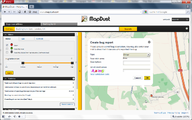 Creating a new bug report.
 -
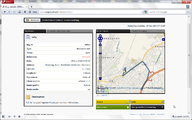 Detailed bug report.
 -
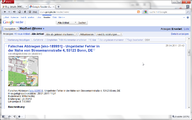 MapDust Geo-RSS-feed.
 -
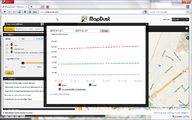 Displaying bug statistics.


FAQ
Where can I add bugs to MapDust?
You can add bugs via the MapDust-Homepage, the JOSM-Plug-In or the MapDust-API.
Where are the bugs stored?
The bugs are stored in a database that is operated by skobbler.
Who will take care of my bug reports?
OpenStreetMap community members can use the bug reports to improve the maps. Bugs can be displayed via the web, a Geo-RSS-feed or as layer in JOSM.
Is there an API for 3rd party software?
There is an API that is beta state currently. If you are interested in using the API request your key at info [at] skobbler.com.
What happens to invalid or irreproducible bugs?
If a bug is obviously invalid or irreproducible for whatever reason just change the bug report to "invalid". Don't hesitate to invalidate a bug.
Under what licence are bug reports distributed?
Bug reports are licenced under a Public Domain licence (Public Domain Dedication and License - PDDL) - no need for attribution or any more restrictive conditions as they solely serve as input/hint where an adjustment of the map is required.
Are there statistics on creating and closing bugs?
The MapDust-Homepage contains several statistics, which are continously extended.
Are there any user terms for using MapDust?
There are Terms of Use on the MapDust-Homepage.
Who has developed MapDust?
MapDust is developed and maintained by skobbler
Why are some bug reports of limited quality?
Many problems are reported through the feedback channel of the skobbler turn-by-turn navigation. Some of those users experience a problem during the route guidance and report the problem. However, not all users are aware of which information has to be provided in order to fix a bug. On the one hand this channels increases the volume of reports, on the other hand this channel reduces the quality of the bug reports.
What does "bug relevance" mean?
The bug relevance indicator tries to automatically evalute the completeness of the information that is required to fix the bug. "High" means that probably most information are available in the bug report to solve the problem. "Low" means that most likely additional information is required to solve the problem.
How can I test the routing behaviour around a bug?
The bug details view contains a tab called "interacting routing". You can change the start and end position of the route to see how the route changes.
Please close the bug as software bug [Close as software bug].