JTileDownloader
| JTileDownloader | ||||||||||||||||||||
|---|---|---|---|---|---|---|---|---|---|---|---|---|---|---|---|---|---|---|---|---|
 | ||||||||||||||||||||
| License: | GNU GPL | |||||||||||||||||||
| Platform: | Cross-platform | |||||||||||||||||||
| Status: | Active | |||||||||||||||||||
| Version: | 0.6.2 (2020-12-27) | |||||||||||||||||||
| Source code: | https://github.com/Zverik/JTileDownloader | |||||||||||||||||||
|
A Java-based application to download tiles from a tile server. |
||||||||||||||||||||
| ||||||||||||||||||||
JTileDownloader is a Java application for downloading OSM tiles. You can paste a 'Permlink' to the application, select a radius in km and zoomlevel, select a renderer and download the tiles. The application is free and the source code is available under the GPL. The program blocks cache requests and thus put a high load on tile servers. Consequently, downloading tiles from OSMF's tile servers using JTileDownloader was blocked. Users need to use other tile servers.
General Information
I have written this small program, because OSMtiledownloader does not support pasting an OSM-URL for downloading the tile files.
Currently there are no error/info messages shown if something went wrong or some values were not entered correctly. This will be fixed in future versions.
Use the discussion tab for reporting bugs and adding feature requests
As I'm very busy at the moment, I do not have time to include new features to the JTileDownloader
- Developers : fma, MrTux, Zverik
- Target platform : Windows, Linux, Mac, ...
- Dev. language : Java
- License Type : GPLv3, see COPYING file for more information
Screenshots
- Screenshots
-
-
-
-
-
-


Description
Main
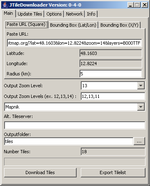
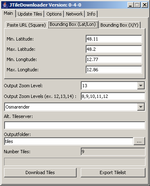
- OutputZoomLevel: Select the zoom level for download
- OutputZoomLevels: Enter the zoom levels to download as comma-separated string (ex. 12,13,14). If the zoom levels are specified in this way, the selected zoom level in the combo box 'OutputZoomLevel' is ignored
- Alt. Tileserver: Here you can specify another Tileserver if the one you prefer is not in the list above this field.
- Outputfolder: Specify here were the downloaded files should be save. If nothing is entered, the downloaded tiles will be stored in a subfolder 'tiles' of the program directory. The folder can be specified as relative or absolute path. Some examples for Windows: myTiles or C:\osm\myTiles Some examples for Linux: osm/tiles or /home/myUser/data/myTiles
- Number Tiles: Informs about the complete number of tiles selected for download/export.
- Download Button: Downloads the files to the specified folder.
- Export Button: Stores a list of all files in a text file called 'export.txt' located under the specified output folder.
Paste URL (Square)
- Paste URL: Paste here the URL (Permlink) from OSM. The application will extract the Lat and Lon values from the link.
- Radius: Enter here the radius from were the tiles should be downloaded (bounding rectangle). As the calculation of the min and max values of the tiles is based on a 'flat' earth, the radius in km may differ from the real world. (Perhaps I will do a better calculation later)
BoundingBox (Lat/Lon)
Select a area to download specified by Latitude/Longitude
- Min. Latitude: Minimum Latitude (ex. 48.3)
- Max. Latitude: Maximum Latitude (ex. 48.9)
- Min. Longitude: Minimum Longitude (ex 13.5)
- Max. Longitude: Maximum Longitude (ex 13.9)
BoundingBox (X/Y)
Select a area to download specified by X/Y tile numbers
- Min. X: Minimum X Tile Number (ex. 4000)
- Max. X: Maximum X Tile Number (ex. 4010)
- Min. Y: Minimum Y Tile Number (ex. 1200)
- Max. Y: Maximum Y Tile Number (ex. 1230)
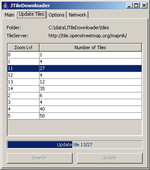
Update Tiles
Provides functionality to update existing tiles. Folder and tile server are taken from Main tab. Just press search and the table is filled with existing zoom levels. Select zoom level(s) and press update button. The tiles get updated.
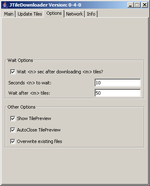
Options
Wait Options
If this is enabled, the JTileDownloader will wait after the specified amount of tiles for the specified seconds before continue downloading the tiles. This option should be enabled if you download a huge amount of tile files to prevent overloading the tile server.
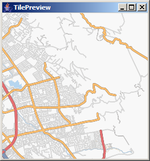
Tile Preview
- Tile Preview: If this is enabled, the last downloaded tile is shown
- Auto Close: Closes the tile preview window automatically after download was completed
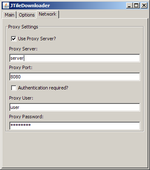
Network
Proxy Settings
Enable this settings if you want to connect through a proxy server.
Install
Just download the .zip file and extract it somewhere on your PC.
Starting the application
Installed java version >= 1.5.0 is required
To start the application, just doubleclick/click (depending on operating system) on the downloaded .jar file.
Additionally start the application with java -jar [NameOfDownloadedFile] (eg. java -jar jTileDownloader-0-4-0.jar)
java -jar jTileDownloader-0-6-1.jar
Use the command line interface
java -jar jTileDownloader-0-6-1.jar dl=tilesUrlSquare.xml
java -jar jTileDownloader-0-6-1.jar dl=tilesBBoxLatLon.xml
example for tilesUrlSquare.xml
<?xml version="1.0" encoding="UTF-8"?> <!DOCTYPE properties SYSTEM "http://java.sun.com/dtd/properties.dtd"> <properties> <entry key="Type">UrlSquare</entry> <entry key="OutputLocation">C:\data\JTileDownloader\tiles</entry> <entry key="PasteUrl">https://www.openstreetmap.org/?lat=47.777&lon=13.322&zoom=11&layers=B000TTF</entry> <entry key="TileServer">https://tile.openstreetmap.org</entry> <entry key="OutputZoomLevel">11</entry> <entry key="Radius">20</entry> </properties>
example for tilesBBoxLatLon.xml
<?xml version="1.0" encoding="UTF-8"?>
<!DOCTYPE properties SYSTEM "http://java.sun.com/dtd/properties.dtd">
<properties>
<entry key="Type">BBoxLatLon</entry>
<entry key="OutputLocation">tiles</entry>
<entry key="TileServer">https://tile.openstreetmap.org</entry>
<entry key="MaxLat">48.2</entry>
<entry key="MaxLon">12.86</entry>
<entry key="MinLat">48.11</entry>
<entry key="OutputZoomLevel">8,9,10,11,12</entry>
<entry key="MinLon">12.77</entry>
</properties>
application specific settings may be set via appConfig.xml (file has to be in the same directory as the .jar file)
example:
<?xml version="1.0" encoding="UTF-8"?>
<!DOCTYPE properties SYSTEM "http://java.sun.com/dtd/properties.dtd">
<properties>
<entry key="WaitSeconds">10</entry>
<entry key="ShowTilePreview">true</entry>
<entry key="UseProxyServer">false</entry>
<entry key="WaitAfterNrTiles">true</entry>
<entry key="ProxyServer"></entry>
<entry key="WaitNrTiles">50</entry>
<entry key="ProxyServerPort"></entry>
<entry key="ProxyServerUser"></entry>
<entry key="AutoCloseTilePreview">true</entry>
<entry key="UseProxyServerAuth">false</entry>
<entry key="OverwriteExistingFiles">true</entry>
</properties>
Releases
JTileDownloader-0-6-2
Released on 27th of December, 2020
- Moved to GitHub
- Removed obsolete layers.
- Changed http to https.
- Fixed user-agent for JMapViewer for it to work again.
JTileDownloader-0-6-1
Released on 28th of May, 2013
- removed osmarender tile layer
- removed no-cache directives (older versions of JTD are blocked now!)
- fixed bug B12 (opencyclemap layers)
- fixed bug B13 (jre7 requirement)
- added feature R18 (zoom levels up to 20)
- added openstreetmap.fr tile layer
JTileDownloader-0-6-0
Released on 6th of November, 2011
- fixed bugs B9, B10, B11
- (B9) Buggy behaviour when longitude > 90, for e.g. try to download something in Indonesia.
- (B10) Copying and pasting an OSM permalink into the 'paste url' doesn't update the latitude and longitude boxes.
- (B11) Does not work with a bounding box with negative longitudes (the same as B9).
- also, some properties were not saved
- added requested features R15 and R16
- (R15) place lat/lon bounds like a cross.
- (R16) Load tiles in metatile order to reduce server load.
- mapnik layer is now default
- reduced downloading speed (now 5 tiles/sec)
- zoom levels can be entered as ranges, e.g. 5-8,10
- logging was moved to java.util.logging infrastructure
- major refactoring
JTileDownloader-0-5-0-pre
(unofficial release)
- fixes bug B9 (the max_lon/min_lon bug)
JTileDownloader-0-5-0
Released 20, March 2011
- fixed bugs B3, B6
- (B3) proxy authorization doesn't work
- (B6) 'Update Tiles' is not working.
- added requested feature R12, R13, R14
- (R12) Download Tiles along a GPX-File with a corridor of "x km" on each side.
- (R13) Could "Overwrite existing files" be split into "always" and "if changed"?
- (R14) Update tiles should not redownload all files. Better only update tiles which are older than a specific date
- added download threads (faster download)
- added more tileservers
JTileDownloader-0-4-0
Released 07, November 2008
- added requested feature R8, R9, R10
- (R10) specify download area by min/max Lat/Lon values or X/Y tile numbers
- (R9) specify multiple download zoom levels
- (R8) included button to stop download
- added 'Info' panel
- added configuration 'Override existing files'
JTileDownloader-0-3-0
Released 24, October 2008
- added requested feature R6
- (R6) Provide functionality to update existing tiles.
JTileDownloader-0-2-0
Released 20, October 2008
- Show list of available tileservers as name instead of URL
- Use system look and feel
- Added simple command line interface
JTileDownloader-0-1-0
Released 09, October 2008
- Did a lot of source refactoring - hope that everything still works as before
- Changed to Java 1.5
- Settings are now stored in .xml files instead of .properties files.
- Display last downloaded tile
- Added possibility to retry downloading failed tiles.
- added requested features R7
- (R7) Added download URLs for cycle map
- fixed B5
- (B5) Download doesn't work. No tiles are downloaded
JTileDownloader-0-0-2
Released 22, August 2008
- added button to choose output folder via dialog
JTileDownloader-0-0-1
Released 21, August 2008
- added requested features R1, R2, R3
- (R1) The option to choose to export the list of tile locations into a txt file rather than downloading them
- (R2) An option to only download a certain amount of tiles, then pause for an amount of time to prevent overloading a server with requests
- (R3) Option to download zoom level 18 tiles
- fixed B1, B2
- (B1) Some times the tile server returns a 500 error and that causes the download q to stop
- (B2) In case of an error (FileNotFound on server), don't abort the download, but resume with the next tile
JTileDownloader-preTest2
Released 31, July 2008
- add functionality to enter directory to store downloaded tiles
- save last entered values on exit
- save last entered values on download button pressed
Following functionality was implemented but I'm really not sure if it would work. Please try the options to connect via some proxy from the 'Network' tab. Please tell me here if the http-proxy settings were working.
- the use of http-proxies without authentication (to be tested)
- the use of http-proxies with authentication (to be tested)
JTileDownloader-preTest1
Released 14, July 2008
- paste a permlink to the application
- enter radius
- select zoom level to download
- choose tile-server
- downloaded tiles are stored under the folder 'tiles' in the current working directory.
Download
Requirements: Java Runtime Environment (Version >= 1.5.0 required)
- December 27, 2020 jTileDownloader-0.6.2.zip
- May 28, 2013 jTileDownloader-0-6-1.zip (source)
Following versions are blocked by OSM tile server:
- November 6, 2011 jTileDownloader-0-6-0.zip
- March 20, 2011 JTileDownloader-0-5-0.zip
- November 7, 2008 JTileDownloader-0-4-0.zip
- October 24, 2008 JTileDownloader-0-3-0.zip
- October 20, 2008 JTileDownloader-0-2-0.zip
Following versions are no more available:
- JTileDownloader-0-1-0.jar, October 9, 2008
- JTileDownloader-0-0-2.jar, August 22 2008
- JTileDownloader-0-0-1.jar, August 21 2008
- JTileDownloader-preTest2.jar, July 31 2008
- JTileDownloader-preTest1.jar, July 14 2008
Source is available at https://github.com/Zverik/JTileDownloader