Key:cutting

 cutting cutting
|
 |
| Description |
|---|
Signifies that a linear feature (e.g. a road) cuts into the surrounding land. 
|
| Group: properties |
| Used on these elements |
    |
| Status: de facto |
| Tools for this tag |
|


An excavated section where the highway or railway is significantly lower than ground level.
See also Cut on Wikipedia.
Usage
Add cutting=yes to a way that is already tagged with highway=*, railway=* or (artificial) waterway=*.
The tag cutting=yes usually means that the original ground level is higher on both sides of the highway, railway or waterway. It is also possible to use cutting=left or cutting=right if the cutting is only on one side of the feature. In this case, cutting=left means that the original ground level is higher on the left side of the way.
The value cutting=both has also been used instead of cutting=yes by some mappers, to make it explicit that the original ground level is higher on both sides of the highway. The value cutting=hollow_way has also been rarely used for a sunken lane (or, hollow way, or holloway): an old road or track that is lower than the land on either side, but historic=hollow_way is more common.
Photos

A railway cutting in Helsinki.
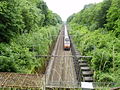
A railway cutting in France.

A historic (100 AD) road cutting in Terracina, Italy.


See also
- embankment=* - the opposite of a cutting
- tunnel=*
- man_made=embankment
- barrier=retaining_wall
- natural=cliff
- natural=earth_bank - earth bank is an abrupt change in ground level which can be clearly distinguished from its surroundings
- natural=gully - small scale cut in relief created by water erosion
- historic=hollow_way
- Proposed features/hollow_way
- Landform examples