NL:MoNav
 | ||||||||||||||||||||||||||||||||||||||||||||||||||||||||||||||||||||||||||||||||||||||||||||||||||||||||
|---|---|---|---|---|---|---|---|---|---|---|---|---|---|---|---|---|---|---|---|---|---|---|---|---|---|---|---|---|---|---|---|---|---|---|---|---|---|---|---|---|---|---|---|---|---|---|---|---|---|---|---|---|---|---|---|---|---|---|---|---|---|---|---|---|---|---|---|---|---|---|---|---|---|---|---|---|---|---|---|---|---|---|---|---|---|---|---|---|---|---|---|---|---|---|---|---|---|---|---|---|---|---|---|---|
 | ||||||||||||||||||||||||||||||||||||||||||||||||||||||||||||||||||||||||||||||||||||||||||||||||||||||||
| Auteur: | Christian Vetter | |||||||||||||||||||||||||||||||||||||||||||||||||||||||||||||||||||||||||||||||||||||||||||||||||||||||
| Licentie: | GNU GPL | |||||||||||||||||||||||||||||||||||||||||||||||||||||||||||||||||||||||||||||||||||||||||||||||||||||||
| Platforms: | Windows, Windows Mobile, Linux, Symbian, en Maemo | |||||||||||||||||||||||||||||||||||||||||||||||||||||||||||||||||||||||||||||||||||||||||||||||||||||||
| Versie: | 0.3 (2011-04-23) | |||||||||||||||||||||||||||||||||||||||||||||||||||||||||||||||||||||||||||||||||||||||||||||||||||||||
| Taal: | Engels
| |||||||||||||||||||||||||||||||||||||||||||||||||||||||||||||||||||||||||||||||||||||||||||||||||||||||
| Website: | http://code.google.com/p/monav/ | |||||||||||||||||||||||||||||||||||||||||||||||||||||||||||||||||||||||||||||||||||||||||||||||||||||||
| Broncode: | http://code.google.com/p/monav/ | |||||||||||||||||||||||||||||||||||||||||||||||||||||||||||||||||||||||||||||||||||||||||||||||||||||||
| Programmeertaal: | C++ | |||||||||||||||||||||||||||||||||||||||||||||||||||||||||||||||||||||||||||||||||||||||||||||||||||||||
|
Routering met Contraction Hierarchies, | ||||||||||||||||||||||||||||||||||||||||||||||||||||||||||||||||||||||||||||||||||||||||||||||||||||||||
| ||||||||||||||||||||||||||||||||||||||||||||||||||||||||||||||||||||||||||||||||||||||||||||||||||||||||

Dit is een vertaling van de Engelse versie van deze pagina op 1 september 2011. De vertaling is nog niet af.
MoNav is een toepassing voor computers en mobiele apparaten dat moderne snelle en exacte routering met OpenStreetMap-gegevens mogelijk maakt.
Inleiding
MoNav is gebaseerd op een proefschrift door Christian Vetter en wordt momenteel gehost op Google Code. In tegenstelling tot vele andere routeringsprogramma's biedt MoNav exacte routering zonder heuristische aannames met zeer weinig berekenwerk. Het routeringsalgoritme is gebaseerd op Contraction Hierarchies.
Componenten
Het programma bestaat uit een aantal componenten:
- monav-preprocessor, de preprocessor, verandert ruwe OpenStreetMap-gegevens in zijn eigen bestandsformaten. Het draaien van de preprocessor kost veel tijd en een grote hoeveelheid geheugen, en een 64-bits besturingssysteem.
- monav, de client, heeft maar weinig hardware-eisen en draait zowel op desktopcomputers als op mobiele apparaten zoals smartphones.
- monav-daemon, de routeringsdaemon, kan worden gebruikt om MoNavs routeringsprogramma te gebruiken voor andere programma's (zoals de SVN-versie van KDE Marble nu al doet).
Functionaliteit
- Zeer snelle routering met weinig benodigd geheugen, zelfs op mobiele apparaten
- Adressen opzoeken
- Rijinstructies
- Gemakkelijk overdraagbaar tussen systemen - de enige afhankelijkheid is Qt
- Windows
- Windows Mobile
- Linux
- Linux Embedded
- Maemo
- Android
- MeeGo?
- Symbian
- en veel meer
Documentatie
De meeste documentatie kan worden gevonden op [1].
Renderen
De client heeft ondersteuning voor de volgende mechanismen om de kaart op het scherm te renderen:
- »OSM Renderer« haalt kaart-tegels op aanvraag van de OSM-servers. Deze render-methode is nuttig voor apparaten met weinig schijfruimte. Aan de andere kant is er wel een internetverbinding nodig om de tegels op te halen.
- »Mapnik Renderer« requires tiles which are stuffed into a special binary file format. Due to the many tiles required, this will consume huge amounts of disk space. On the other hand, maps can be rendered even when no internet connection is available.
- »Qtile Renderer« requires that the preprocessor packed geometry data into a special binary file format. Map tiles are then rendered "on the fly". This method requires less disk space than the »Mapnik Renderer« and also works without an internet connection. As a tradeoff, it requires more horsepower to compute the tiles and will thus drain the battery of your mobile faster.
Preprocessing
- GUI Mode: The preprocessor can be invoked without any command line options and will then start providing a graphical user interface. In this mode, it can be used to configure the preprocessing steps. If done, save the settings to a config file.
- Console Mode: The console preprocessor can be used to process whole sets of map packages.
Compilatie
Dankzij het werk van James Hollingshead bevat MoNav 0.3 (in SVN) de eerste poging tot een vectorrenderer die als doel heeft snel te zijn en de benodigde kaarttegels te tekenen op het moment dat ze nodig zijn. De huidige SVN-code is daardoor echter wat moeilijker te compileren en te gebruiken, vandaar deze handleiding. De volgende Bash-commando's zijn uitgevoerd met Ubuntu Lucid 10.04.1 (LTS). U hebt ten minste de Qt 4.5-ontwikkelingspakketten nodig, en waarschijnlijk nog wat andere pakketten tot MoNav goed compileert.
De programma's compileren
Laten we eerst een map maken waar alle dingen inkomen die nodig zijn om MoNav te compileren en uit te voeren:
cd ~
mkdir MoNav-0.3
cd MoNav-0.3
Haal de huidige code van de Subversion-server:
svn checkout http://monav.googlecode.com/svn/trunk/ SVN
cd SVN
MoNav bestaat uit vier programma's. Behalve voor de routeringsdaemon hebben we ze allemaal nodig:
- monavroutingdaemon
- monavpreprocessor-gui
- monavpreprocessor
- monavclient
To compile the preprocessor-gui, use the following commands:
qmake monavpreprocessor-gui.pro && make
After that, a binary should appear in the bin directory. Next, compile the preprocessor itself. Note that you'll need to pass DEFINES+=NOGUI on the command line:
make distclean
qmake DEFINES+=NOGUI monavpreprocessor.pro && make
After that, a further binary should appear in the bin directory. Next, compile the client, the actual "end user" application. You will need qtmobility installed to compile the client. If you haven't (e.g. on desktop computers), use DEFINES+=NOQTMOBILE to avoid errors:
qmake DEFINES+=NOQTMOBILE monavclient.pro && make
This should result in a third binary appearing in the bin directory:
ls ./bin/
monav monav-preprocessor monav-preprocessor-gui plugins_client plugins_preprocessor
In case nothing went wrong, the most challenging tasks are now accomplished.
Compiling the Maps
The next steps will create some map data. First create some directories to save the data necessary:
cd ..
mkdir osm monavmaps
Download some osm data. Choose a small file, as the map conversion requires both time and resources. Better try a small area first and convert another file later if you are sure you are pleased with the results:
cd osm
wget -c http://download.geofabrik.de/osm/europe/germany/saarland.osm.pbf
Next convert the downloaded data to MoNav map data. To ease the process, download the preconfigured file for bike routing first:
cd ..
cd monavmaps
wget http://christeck.de/wp-content/uploads/saarland.ini
It's just an ordinary text file, editable in your editor of choice (but please remember that editor binaries always consist of two characters only). Alternatively open the file in the preprocessor GUI:
../SVN/bin/monav-preprocessor-gui
Press the button Load Settings... and select the downloaded file saarland.ini and adjust it to your likings. Save the settings file and close the preprocessor GUI.
Now the actual conversion is due. The preprocessor provides tons of command line switches. Let's use a couple of them:
../SVN/bin/monav-preprocessor -di -dro -dre -da -dc -t=2 --name="saarland" -s="./saarland.ini" --verbose
This will take a little time. As soon the map data is converted, it is time to open it in MoNav.
Using the Maps
../SVN/bin/monav
In case MoNav complains a lot, delete or move its configuration file first:
mv ~/.config/MoNavClient.conf ~/.config/MoNavClient-old.conf
Choose the directory monavmaps containing the converted map data. Then click on the map view on the left hand side of the dialog and click the button Load. In case MoNav asks whether to uncompress the map data, confirm. MoNav then should prompt you with its viewport.
In case no map data is visible yet, click on the red circle button, choose address and select a location within your data set. This will center MoNav's viewport around the desired area. In the example above, the inner city of Speyer is shown.
Links
Gerelateerde programma's
- Open Source Routing Machine deelt enige code met MoNav
- KDE Marble gebruikt MoNav om offline routes te berekenen
- luckyGPS gebruikt MoNav voor verschillende functionaliteit
Schermafdrukken
-
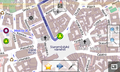 Maemo5 op een N900
 -
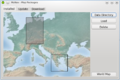 Kaartpakket-selectie
 -
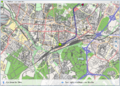 Qtile vector-renderer
 -
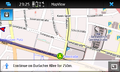 Maemo5 op een N900
 -
 Adres-opzoekfunctie
 -
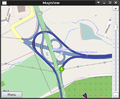 2D-kaart
 -
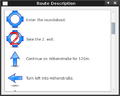 Rijinstructies
 -
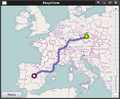 Een lange route


