Relation:multipolygon
 multipolygon multipolygon
|
 |
| Description |
|---|
The multipolygon relation is used to represent complex areas. 
|
| Group: properties |
| Members |
|
| Implies |
| Status: de facto |
| Tools for this tag |


Relations of type multipolygon are used to represent areas ( polygons), typically complex ones with holes inside, or consisting of multiple disjoint parts. They can also be useful to make the distinction between linear objects (e.g. a fence surrounding a property, tagged on the way) and the area inside (tagged on the multipolygon relation) without having to draw overlapping ways.
Simple areas are mapped in OSM by creating a closed way and tagging it with something that suggests an area rather than a line. For example, a closed way tagged landuse=forest will be assumed to be an area, while one tagged highway=trunk will not. However, this model only works for areas whose outline consists of a single way, and which do not have holes. Any area that is more complex than that (e.g., because its outline consists of several ways joined together, or because the area consists of multiple disjoint parts, or has holes) requires a multipolygon relation.
A multipolygon relation can have any number of ways in the role outer (the outline) and any number of ways in the role inner (the holes), and these must somehow form valid rings to build a multipolygon from.
.svg)
How to map
iD
In iD you can select area and inner area, and select action "Combine" to create a multipolygon.
Mapping a lake with a small island in it:
Start by creating an  area around the outer perimeter of the feature.

Tag it as as a lake.

Create an around the inner perimeter of the lake and tag it accordingly: in this case a small islet.

Select both areas (using shift-click), then right-click on either of the areas to open the edit menu and choose the "Merge" operation. Alternatively, it is also possible to use the keyboard shortcut "C" of that operation after selecting both features.

Mapping a building with a hole in it:
Draw  Line(s) around the outer edge of the feature.

Draw Line(s) or Area(s) around the inner edge(s) not part of the feature.

Select all of the outer and inner elements of the feature by using Shift-click.

With the elements selected, click on "Add to a relation" button at the bottom of the sidebar.

Select the "Choose a parent relation" input and click on "New relation..." in the dropdown.

Click on "Multipolygon" in feature list.

Select the feature type of the multipolygon.
In the Issues section of the feature menu, resolve the all of the issues by setting the each of the lines as "inner" or "outer".
Hover over the issue to see what element iD is referencing (it will be highlighted in blue) so that you know if it is the inner or outer part of the multipolygon.
Here, the pointer is hovering over the first issue and the outer line of the building is blue, so it should be set to outer by clicking "Set to outer".

The selected feature is now a complete multipolygon relation. This is shown by the feature having the type=multipolygon tag, at least one member with role "outer" and one member with role "inner", and no issues.

If any of the inner elements, whether they are Lines or Areas, also represent another feature that can be mapped; you are free to select the inner element and change it's feature. Outer Lines however, should always remain Lines.
For example, the inner feature in the example could be a Courtyard area.

For reference, you can see the example used on OSM.
JOSM
Use Menu/Tools/Create Multipolygon or ctrl-b shortcut
Mapping a wetland with a pond inside:
-
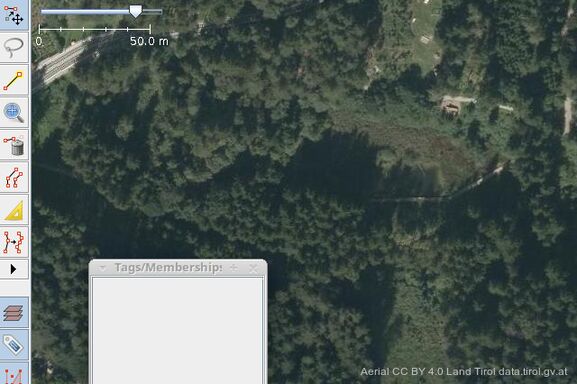 Aerial of the scene
 -
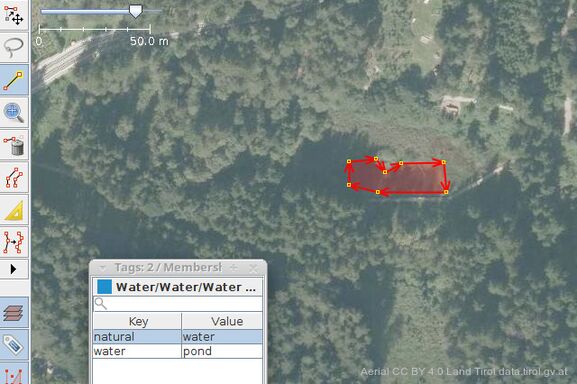 Draw contours of the pond and tag as such
 -
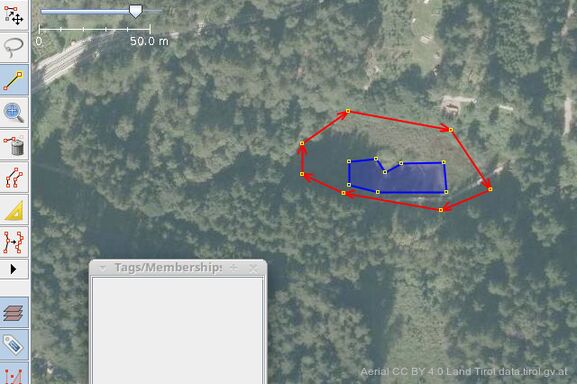 Draw contours of surrounding wetland, do not tag
 -
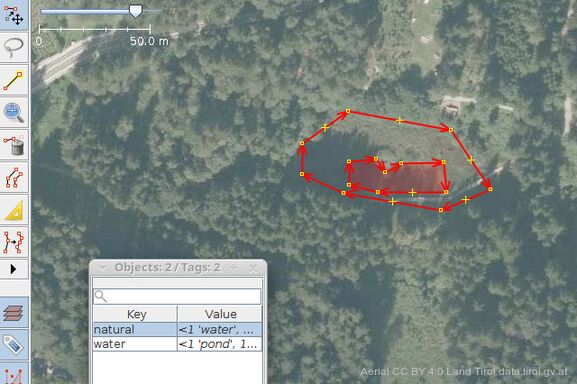 Select both new entities
 -
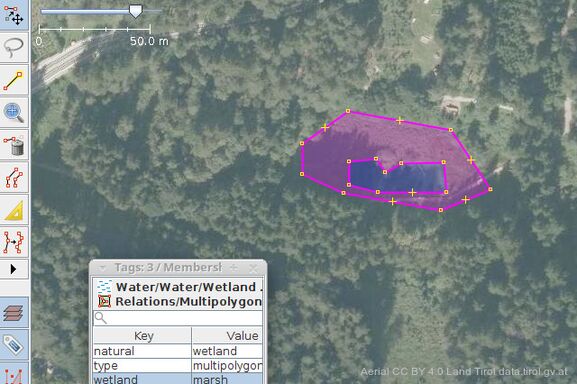 Hit ctrl-b or pull down Menu/Tools/Create Multipolygon and tag as wetland


Note: If some of the ways are there already, after collapsing outer and inner ways into a multipolygon, tagging of the outer ways will remain in place and should be removed from its properties. The editor will warn before uploading. Recent releases of the JOSM editor will perform this step automatically.
Mapping a wood with adjacent wetlands inside:
-
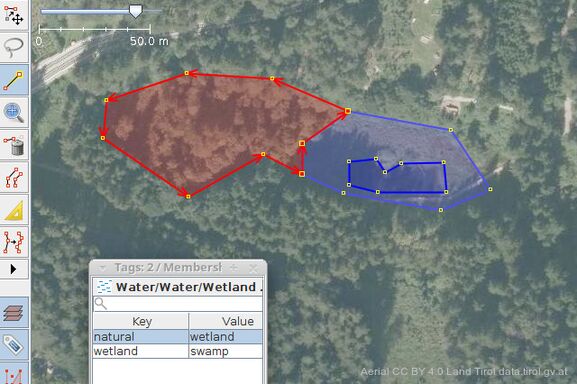 Draw contours of second wetland, tag as such
 -
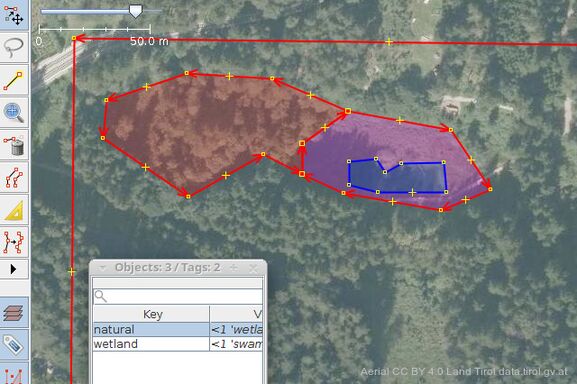 Select both the wetlands and the surrounding woods
 -
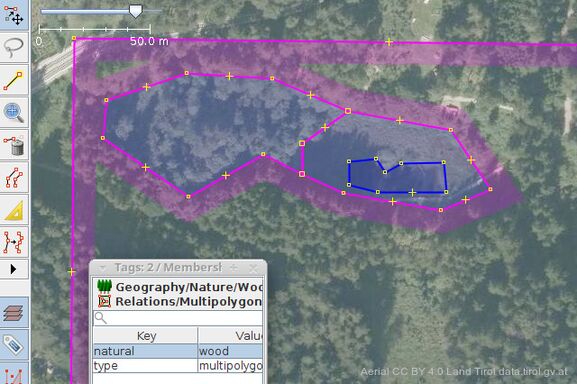 Make this into a multipolygon too, tag as such
 -
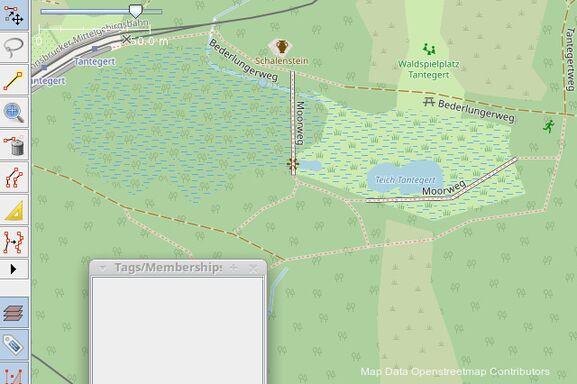 Renderer will not have to guess what is meant


Note: The multipolygon created this way does not comply with the OGC specification. See below for explanation.
The OGC specification does not allow the border, that separates the inner rings only among themselves, to be part of the outer multipolygon. Instead of just combining our wetlands, We need to create one extra way:
-
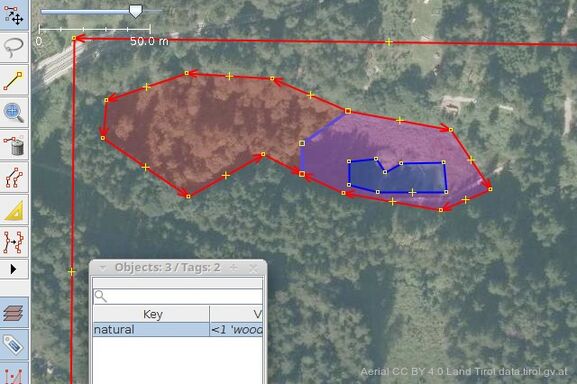 Trace the outline of both of the inner areas as a new way, do not tag. Select both this and the surrounding way as members of the newly created multipolygon.

Note: Another method to create an OGC compliant multipolygon would be, to split the outlines of the inners, such that only those parts can be combined, where they touch their outer, without including the border that separates the inners alone.
Vespucci
Tags
| Key | Value | Explanation |
|---|---|---|
type
|
multipolygon
|
Tells applications to use area-building rules on the members. |
boundary |
* |
Do not use (deprecated). Use type=boundary instead (these are similar relations, but with additional non-way members with specific roles).
|
natural
|
*
|
At least one tag describing the kind of feature (such as natural, landuse, building, man made, amenities, leisures, pedestrian areas, waterbanks...) covering that area. Most of these tags are mutually exclusive (use separate multipolygons if needed, the common rule is: "one feature, one element"), because their additional informative tags may have conflicting interpretations. |
landuse
|
*
| |
building
|
*
| |
man_made
|
*
| |
amenity
|
*
| |
leisure
|
*
| |
highway
|
pedestrian
| |
waterway
|
*
| |
| ... | ... | |
layer
|
*
|
Optional additional tags for informative properties (such as subtypes of features, layers, names, references, notes, ...). This tag are used in exactly the same way as for areas tagged as simple area. |
name
|
*
| |
note
|
*
| |
| ... | ... |
Members
| Way or Node | Role | Recurrence? | Explanation |
|---|---|---|---|
| or
|
|
one or more | The ways (possibly self-closed) making up the required outer ring(s) delimiting the area. |
| or
|
|
zero or more | The ways (possibly self-closed) making up the optional inner ring(s) delimiting the excluded holes that must be fully inside the area delimited by outer ring(s). |
| or
|
none | zero | Do not use (deprecated). Tools may handle this as |

|
any | zero | Do not use. |

|
any | zero | Do not use. |

Usage
The intended use of multipolygons is this:
- Tags describing the multipolygon (e.g.,
landuse=forest) always go on the relation. The outer way(s) must be left untagged[1], unless they describe something in their own right. For example, a forest could be delineated by four fences, in which case the four ways would be tagged with the barrier tag, but could still be used as "outer" members of the forest relation. - If the inner way represents something in itself (e.g., a forest with a hole where the hole is a lake), then the inner way must be tagged as such.
- Otherwise the inner way(s) should be left untagged.
- The direction of the ways does not matter.
- The order of the relation members does not matter (but properly sorted member lists can help mappers to verify completeness and spot problems).
Historically, especially in Germany, type=multipolygon has been used instead of type=boundary for boundary relations. This method was not widely accepted and should be considered deprecated.
Valid multipolygon conditions
Generally, the multipolygon relation can be used to build multipolygons in compliance with the OGC Simple Feature standard (Graphical examples of OGC validity). Anything that is not a valid multipolygon according to this standard (e.g., polygons with intersecting rings) should also be considered an invalid multipolygon relation, with the notable exception of touching inner rings (see below).
We define a valid (closed) polygon as the combination of a subset of member ways which, when their endpoints are joined, form a closed polygon
We define an unclosed way as a combination of nodes in which the first node is different than the last node.
The conditions to form a valid multipolygon relation are the following:
- Member ways of a multipolygon relation must form one or more closed polygon(s) When the ways belonging to the relation are combined they must form one or more closed chains. [2]
- Exactly two unclosed ways, and no more should share an endpoint (e.g. the most extreme nodes of a way represented by the black dot in the images).
- If an endpoint is shared by less than two unclosed ways, the polygon can't be closed and is ill formed. invalid example 1
- If an endpoint is shared by more than two unclosed ways, it's ill formed and a closed polygon can't be reconstructed unambiguously. invalid example 2 (Exception - points shared by an even number of unclosed ways might be part of touching inner rings which is ok.)
- Inner polygons must not overlap with outer polygons, and not touch on common segments (except at isolated nodes as discussed above). Overlapping can be avoided completely by reshaping.
Examples in XML
One outer and one inner ring
The simplest and most often used case is one outer ring and one (or more) inner rings consisting of single closed ways.
<relation id="1">
  <tag k="type" v="multipolygon" />
  <member type="way" ref="1" role="outer" />
  <member type="way" ref="2" role="inner" />
</relation>
|
 |
- Example of tagging for actual features
Let's assume that the previous geometry represents a pond within a forest. Here are two competing ways to tag these features:
<relation id="1">
  <tag k="type" v="multipolygon"/>
  <member type="way" ref="1" role="outer"/>
  <member type="way" ref="2" role="inner"/>
</relation>
<way id="1">
  <tag k="natural" v="forest"/>
  <tag k="name" v="Grey Wood"/>
  <nd ref="101"/><nd ref="102"/><nd ref="103"/>
  <nd ref="104"/><nd ref="105"/><nd ref="101"/>
</way>
<way id="2">
  <tag k="natural" v="water"/>
  <tag k="water" v="pond"/>
  <tag k="name" v="Whitewater"/>
  <nd ref="201"/><nd ref="202"/><nd ref="203"/>
  <nd ref="204"/><nd ref="201"/>
</way>
This is incorrect : the multipolygon still represents only a geometric surface but no feature, and the forest surface in way #1 fully overlaps the pond in way #2. Renderers or applications will not correctly handle this case, and the rendered pond will be left invisible even if it has been correctly drawn and filled because it will be completely masked by the forest area. |
<relation id="1">
  <tag k="type" v="multipolygon"/>
  <tag k="natural" v="forest"/>
  <tag k="name" v="Grey Wood"/>
  <member type="way" ref="1" role="outer"/>
  <member type="way" ref="2" role="inner"/>
</relation>
<way id="1">
  <nd ref="101"/><nd ref="102"/><nd ref="103"/>
  <nd ref="104"/><nd ref="105"/><nd ref="101"/>
</way>
<way id="2">
  <tag k="natural" v="water"/>
  <tag k="water" v="pond"/>
  <tag k="name" v="Whitewater"/>
  <nd ref="201"/><nd ref="202"/><nd ref="203"/>
  <nd ref="204"/><nd ref="201"/>
</way>
This is correct (much better): the forest tags are transferred from the outer way to the multipolygon, the forest no longer overlaps the inner pond in way #2, which keeps its own tags, and the inner way #1 itself is left without any tag (it does not represent the forest or any feature, it's used only here for defining the complete geometry of the multipolygon). Ways without any tag are valid in OSM when they are referenced as members of one or more relations. |
One outer and two inner rings
<relation id="1">
  <tag k="type" v="multipolygon" />
  <member type="way" ref="1" role="outer" />
  <member type="way" ref="2" role="inner" />
  <member type="way" ref="3" role="inner" />
</relation>
|
 |
Multiple ways forming a ring
The multipolygon schema allows any inner or outer ring to consist of more than one way. This is useful for multipolygons encompassing very large areas, where it would be impractical to have one way run around the whole of it:
<relation id="1">
  <tag k="type" v="multipolygon" />
  <member type="way" ref="1" role="outer" />
  <member type="way" ref="2" role="outer" />
  <member type="way" ref="3" role="inner" />
</relation>
|
 |
Two disjunct outer rings
Unlike simple multipolygons, the multipolygon relation allows any number of outer rings and thus is a true multipolygon:
<relation id="1">
  <tag k="type" v="multipolygon" />
  <member type="way" ref="1" role="outer" />
  <member type="way" ref="2" role="outer" />
</relation>
|
 |
Two disjunct outer rings and multiple ways forming a ring
The ability to combine a ring from individual ways is not limited to outer rings, it can also be used for inner rings:
<relation id="1">
  <tag k="type" v="multipolygon" />
  <member type="way" ref="1" role="outer" />
  <member type="way" ref="2" role="inner" />
  <member type="way" ref="3" role="inner" />
  <member type="way" ref="4" role="outer" />
  <member type="way" ref="5" role="inner" />
</relation>
|
 |
Complex combination
This example shows a complex combination of all features: three outer rings, two of which have one or more inner rings, and plenty of them consisting of more than one way.
<relation id="1">
  <tag k="type" v="multipolygon" />
  <member type="way" ref="1" role="outer" />
  <member type="way" ref="2" role="outer" />
  <member type="way" ref="3" role="outer" />
  <member type="way" ref="4" role="outer" />
  <member type="way" ref="5" role="inner" />
  <member type="way" ref="6" role="inner" />
  <member type="way" ref="7" role="inner" />
  <member type="way" ref="8" role="inner" />
  <member type="way" ref="9" role="inner" />
  <member type="way" ref="10" role="inner" />
  <member type="way" ref="11" role="inner" />
  <member type="way" ref="12" role="outer" />
  <member type="way" ref="13" role="outer" />
  <member type="way" ref="14" role="outer" />
  <member type="way" ref="15" role="outer" />
  <member type="way" ref="16" role="inner" />
  <member type="way" ref="17" role="inner" />
  <member type="way" ref="18" role="inner" />
  <member type="way" ref="19" role="inner" />
  <member type="way" ref="20" role="outer" />
</relation>
|
|
Island within a hole
From the possibility of having multiple outer rings in one relation, it also follows that you can easily model "islands" within a hole:
<relation id="1">
  <tag k="type" v="multipolygon" />
  <member type="way" ref="1" role="outer" />
  <member type="way" ref="2" role="inner" />
  <member type="way" ref="3" role="outer" />
</relation>
A construct like this would previously have required different multipolygon relations, one with way 1 being outer and way 2 being inner, as well as one with way 2 being outer and way 3 being inner. Such cascading is still needed when the "island" in the middle is something else than the area on the outside, but where the "island" is the same stuff it can just be made a hole in the hole. Beware though, that following this method, still a dual determination of the area mapped by way 3 will be created, as the hole and the island DO overlap! |
 |
Touching inner rings
Some mappers use the current "multipolygon" relation for combining touching inner rings:
<relation id="1">
  <tag k="type" v="multipolygon" />
  <member type="way" ref="1" role="outer" />
  <member type="way" ref="2" role="inner" />
  <member type="way" ref="3" role="inner" />
</relation>
An implementation of multipolygons should attempt to render these as if the touching rings were indeed one ring. This is the one case where OpenStreetMap use deviates from standard OGC Simple Features. In Simple Features, touching inner rings are not supported because they are unnecessary (why make two inner rings when you could combine them into one). In OpenStreetMap, they sometimes make sense if tagged individually, for example a forest with a clearing which is half occupied by a lake and half by farmland - you would have two "holes" in the forest, one being tagged as Avoid building multipolygons where an inner ring touches an outer ring though. There is some discussion about this section on the talk page. |
 |
Invalid examples
Some examples of invalid multipolygon relations to illustrate what should NOT be done
Unclosed polygons
| This is an example of an invalid multipolygon as way #2 and way #3 are not connected. |  |
Overlapping, unclosed member ways belonging to the same role
| This is an example of an invalid multipolygon as way #2 and way #3 endpoints share more than two ways. |  |
Multipolygon created by only one polygon
| This is an example of an invalid multipolygon as node 4 and 5 are reused as 10 and 11. According to Open Geospatial Consortium’s (OGC) OpenGIS rules, this is not a valid polygon. It will create an error note in the Osmose quality assurance tool. |  |
More examples
- More examples of valid multipolygon on the page Multipolygon Examples.
- Proposition for examples of valid and invalid unusual configuration
Implementation notes
- The drawing style is always taken from the tagging of the relation itself.
- Drawing of inner areas is handled independent from multipolygon - inner ways can form closed rings with area tags or also be outer ways of multipolygons.
- Area styles containing drawing rules for their boundaries can lead to conflicts - An inner way may have a line style (e.g. fence) an own area style (e.g. water) and an multipolygon area style (e.g. forest). Each software may define drawing order different, but a general rule may be to give line style highest priority and multipolygon area style for inner ways the lowest priority.
- There is a suggested algorithm for processing multipolygons.
- Note that before May 2017, some multipolygons also had their tags on the outer way (if there was only one such way or all ways had the same tags) while keeping the respective multipolygon-relation untagged. But when consuming older OSM data excerpts, it is necessary to handle such old style multipolygons, too. See old style multipolygons for historic notes.
Mapping style, best practice
Multipolygons open up the possibility to create geometrically identical objects in different styles: as ways or as multipolygons, using closed or open ways, or with shared or unshared ways. This raises the question of which mapping style to use. Some styles have advantages over others, and should be regarded as good practice. For others, the choice is more of a matter of preference, or whether one is an experienced or an inexperienced mapper.
Most generally, when large areas share the same tag, they can be represented either by a large number of small multipolygons or closed ways, or by a smaller number of large multipolygons. For multipolygons themselves, two possible mapping styles are:
- Method A
- Inner and outer rings are created from closed ways whenever possible, except when these ways become very large (on the order of 2000 nodes). Ways are usually not shared by different multipolygons
- Method B
- Every border between two multipolygons is represented by a unique way which is then shared by the adjacent multipolygons. Consequently the multipolygon rings are often composed of several open ways
The question of best practice for multipolygons has been discussed intensively over the years, see Talk:Relation:multipolygon and the forums. A final consensus hasn't emerged yet, but the following observations apply:
- Mapping simple closed areas as multipolygons instead of ways increases the number of database objects and increases rendering time. This additional overhead of complexity should be avoided.
- Sharing way segments between multipolygons (method B) offers a representational efficiency by avoiding redundant representations of overlapping ways.
- Multipolygons consisting of non-closed ways (method B) are harder to handle by inexperienced users, and simple editors such as Potlatch 2. This has often led to the accidental destruction of such multipolygons by unsuspecting users.
- Many experienced users have expressed their discomfort with method B, especially when the multipolygons are very large.
- Huge multipolygons cause a slowdown of the rendering process.
- Editing complex geometries in JOSM is easier, faster and less error-prone with method A. This is because method B requires deletion, creation and insertion of several way segments into the correct multipolygon relations.
So far there are no official restrictions on how to use multipolygons as long as they are geometrically valid. However adopting a considerate mapping style will help to keep the database clean and keep editing easy for every user.
Helping tools
- Relation Check
- OSM Inspector has support for multipolygon checks as part of the "Areas" view
Possible technical mistagging
 |
The attribute |


See also
- Relation:multipolygon/validity
- See The Future of Areas for some discussions on how to improve area handling in OSM.
- Relation:multilinestring