Tag:man_made=cutline

 man_made = cutline man_made = cutline
|
 |
| Description |
|---|
A straight line cut in a forest. 
|
| Rendering in OSM Carto |

|
| Group: man made |
| Used on these elements |
    |
| Useful combination |
| Status: de facto |
| Tools for this tag |
|


A cut line is a straight line cut in a forest. This might be done for various purposes, such as denoting land ownership borders, splitting forest in sections to ease maintenance, as firebreaks or for other reasons. These lines are useful for navigation in forests and usually easy to identify from satellite or aerophotos.
How to map
Tag a line that is drawn on top of one of the following areas:
with man_made=cutline. If the forest is not mapped yet, cutlines can be mapped alone.
Depending on the nature of the cutline, subtype can be specified:
- cutline=border - for cutlines that denote ownership border;
- cutline=section - cutlines that split forests in sections for maintenance;
- cutline=firebreak - cutlines that are intended to stop or delay forest fire;
- cutline=loggingmachine - logging machine tracks that are impassable due to lopwood;
- cutline=piste - skiing piste without visible tracks in the summer;
- cutline=pipeline - above an underground pipeline;
- cutline=hunting
- cutline=power_line - to make way for installing, inspecting, maintaining power lines (635 uses as of 2024-02).
- cutline=aerialway - where draglift, ski lifts, gondola etc pass thru forest or scrub.
If a road (usually highway=track or highway=path) follows the cutline, it is to be tagged as such in addition to cutline tags.
If a forest area is extremely large, cutlines can be a good choice to split the area.
Examples
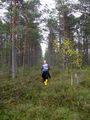
Cutlines come in various sizes and can be more or less obvious in the surrounding vegetation

Rendering
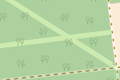
OSM Carto shows a narrow white line along the cutline

Possible tagging mistakes
See also
- Firebreak on Wikipedia
- Fire trail on Wikipedia (only access roads)