Key:tactile_paving

 tactile_paving tactile_paving
|
 |
| Description |
|---|
Indicates whether a blind or visually impaired pedestrian can detect or follow the feature using a cane. 
|
| Group: accessibility |
| Used on these elements |
    |
| Documented values: 4 |
Status: approved
|
| Tools for this tag |
|


Tactile paving is a system of textured ground surface indicators found on footpaths, stairs and public transportation platforms to assist pedestrians who are blind or visually impaired. A tactile paving area has a surface that is easy to detect using a long cane, typically because it is rougher than the surrounding surface area or has an embossed pattern.
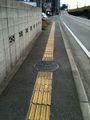
Tactile paving on a sidewalk. Line tile means go and dot tile means attention.
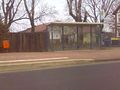
Tactile paving (white) at a bus stop in Germany.

Tactile paving warning about a lowered kerb.
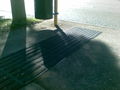
Australian bus stop showing two different tactile patterns.
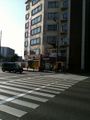
Japanese zebra crossing with tactile paving.
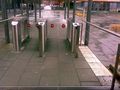
tactile_paving=incorrect - The paving is not where you walk - You don't find the door.
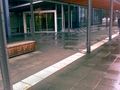
tactile_paving=incorrect - The paving is not where you walk - You run into the poles. The paving to the door is missing / there are tactile elements used for decoration.

tactile_paving=primitive - A curb cut with divots in the concrete to prevent pedestrians from slipping.


Common values
- tactile_paving=yes
- tactile_paving=no
- tactile_paving=contrasted Where there is a tactile paving which contrast is at least 70% the colour of the ground (white if the ground is black and vice-versa).
- tactile_paving=primitive Where any water drain or decorative tactile element can be used for orientation accidentally, but no typical tactile ground elements are used.
- tactile_paving=incorrect Where tactile paving is used but not in a sensible way, e.g. if the paving is symmetric for visual pleasure but on one of the sides it leads to nothing, or if only one sloped kerb at a crossing has tactile paving. It may be sensible if tactile paving leads to a building wall, because the way continues next to the wall and it can be used for orientation with a white cane.
- tactile_paving=partial
Note: There is no default value. tactile_paving=no can be tagged explicitly if discovered.
Use
Use on nodes 
In general: Use precise coordinates or add fixme=position estimated!
- For dangerous spots
- On the node of a highway=crossing, if the tactile paving is only on one side then tactile_paving=incorrect is mostly used (some mappers, however, prefer the tag tactile_paving=partial instead, to be more precise).
- When a footway next to a road ends at a crossing with a lowered kerb (kerb), tactile_paving is often used to indicate the dangerous spot tactile_paving=yes. This is set separately for each side of the road, because it can be different! Use in the same way on traffic islands. This should be used in addition to, not instead of, tagging on the crossing node itself.
- When a bus stop is mapped as a node highway=bus_stop and there is one or more lines of tactile_paving at that bus stop, the bus_stop node gets tactile_paving=yes
- highway=elevator, when there is a tactile paving at the entrance of an elevator ON EACH LEVEL!
Tactile paving (white) at a bus stop in Germany. Correct use of tactile paving on node.
Tactile paving warning about a lowered kerb. Correct use of tactile paving on node.
Australian bus stop showing two different tactile patterns. Correct use of tactile paving on node.
Use on ways 
- On a pedestrian crossing highway=crossing, when the tactile paving is used in a line all across the crossing. Do not use tactile_paving=* on the way when only the two spots where the footway ends are paved differently.
Tactile paving on a sidewalk. This is correct use of tactile paving on a way.
Japanese zebra crossing with tactile paving. This is correct use of tactile paving on a way.
- On footways, when there is a line all the way on the footway highway=footway.
- On platforms, highway=platform or man_made=pier. If the platform or pier is mapped as an area, only if you draw a separate way for the tactile lines. If the platform or pier is small and mapped as a way, add tactile_paving=yes to the way.
- Use on the way highway=steps of steps (some of which have conveying=*), even if there is only a spot with tactile paving at each end.
- Use
yeswhen there is tactile paving at the top and bottom of the steps. - Use
nowhen there is no tactile paving. - Use
partialif there is only tactile paving at the top (the stairs themselves are sufficient tactile objects to be detected with a cane). - Use
incorrectif there is only tactile paving at the bottom (the dangerous point is the top).
- Use
Use on areas 
- tactile_paving=yes is not used on areas. If you have a large area (like a market place) with indicator lines across, draw separate ways for the tactile paving and map on ways.
- tactile_paving=no can be used on border polygons to indicate that a community is not aware at all of the requirements of blind persons.
Use on relations 
- tactile_paving=yes can be used on route/tram relations for instance, when all vehicles in use are equipped with tactile indicators at the doors or similar. Please add blind:description:en=* to tell about the details.
Typical combinations
- OSM for the blind
- blind:description:en=* See DisabilityDescription.
- traffic_signals:sound=yes/no
- traffic_signals:vibration=yes/no
- traffic_signals:floor_vibration=yes/no
- traffic_signals:arrow=yes/no
- traffic_signals:minimap=yes/no
Editing with JOSM
In JOSM the Map Paint Style Sidewalks and footways (with knobs on) can be used to visualize the presence of tactile_paving=* when used on ways :

Rendering
Tactile paving does not need to be rendered on visual maps by default. It will be used for tactile maps and acoustic routing software for pedestrians.
There is a visual map for features for the blind: blindmap.
- HaptoRender - Tactile OSmaps for the blind.
- LoroDux - Pedestrian navigation software for the blind
- Loadstone - GPS tool for the blind, able to import OSM POIs and crossings.
See also
- tourism=information with information=tactile_map
- Category:Visual Impairment
- OSM for the blind
- LoroDux - Pedestrian routing software for the blind
- HaptoRender - Haptic (tactile) maps for the blind
- Original Proposal: Proposed features/Tactile paving