Tag:amenity=toilets

 amenity = toilets amenity = toilets
|
 |
| Description |
|---|
A publicly accessible toilet 
|
| Rendering in OSM Carto |

|
| Group: amenities |
| Used on these elements |
    |
| Useful combination |
|
| See also |
Status: approved
|
| Tools for this tag |
|


Use amenity=toilets to identify the location of a toilet open to the public. Public toilets are commonly referred to as restrooms, washrooms, bathrooms, or toiletrooms.
How to tag
Place a node centrally at the location of the toilet amenities and tag it amenity=toilets. Alternatively draw an area over the toilet area and tag it with amenity=toilets, and if located in a dedicated building with building=toilets.
Following tags maybe useful to mark important properties:
- fee=yes/no - specify whether a fee is required.
- opening_hours=* - specify opening hours of the toilet, especially if not always open opening_hours=24/7.
- wheelchair=yes/no/limited - for wheelchair accessibility.
- changing_table=yes/no/limited - availability of a nappy changing table.
You can tag toilet type with the following tags:
- toilets:disposal
- toilets:disposal=flush - toilets that move waste away from immediate area using a liquid (usually water).
- toilets:disposal=pitlatrine - waste falls into a lined or unlined pit. If pitlatrine is composting composting=yes.
- toilets:disposal=chemical - waste falls into a lined pit filled with a chemical.
- toilets:disposal=bucket - waste drops into a container which is periodically removed by hand.
- toilets:disposal=dry_toilet - a device dehydrates waste into dry matter.
- toilets:disposal=tank - a storage tank emptied by a pumping truck. Often used for portable toilets.
- toilets:position=seated/urinal/squat - specify sitting position, use a semicolon to separate multiple values.
Image Description Tag 
Only seated toilets toilets:position=seated 
Only urinal toilets toilets:position=urinal 
Only squat toilets toilets:position=squat 

Seated and urinal toilets; i.e., more than one type. toilets:position=seated;urinal (types listed separated by semicolons)


Toilets can have complex access rules. Those rules useful to toilets include:
- access=yes - explicitly public and open to whoever walks up (a fee=* may still apply).
- access=customers - while open to the public, the clear policy is to require a purchase prior to use. You may need a key or code to get in. Some people also use access=destination, and a few use locked=* for this.
access=private,access=noDiscouraged. amenity=toilets is for toilets "open to the public". Frequently it is used where access=customers should be used.
Useful combinations include:
- description=*
- drinking_water=yes/no - if a drinking water source is immediately associated with (usually outside) the toilet. Note: for micro mapping, it is better to create a separate node with amenity=drinking_water.
- indoor=yes - if the toilet entrance is indoors. Outdoor entrances are otherwise assumed.
- name=*
- operator=* - name of entity responsible for toilet (e.g. "City of X").
- supervised=yes/no/interval - if the toilet is staffed. Note that a cleaner might expect a tip.
The male/female access details might be tagged simply for the overall amenity=toilets object:
- female=yes/no - whether women can use this toilet.
- male=yes/no - whether men can use this toilet.
- unisex=yes - unisex toilet.
- child=yes/no - children (seats and urinals for children).
Use gender_segregated=yes/no to unambiguously state whether a toilet is gender segregated or not.
It can be useful to map entrances or even areas of a toilet separately.
- entrance=yes would typically go on a node on each entrance
- female=yes/no, male=yes/no, unisex=yes/no tags go on the same entrance nodes or even on an area within a building.
Detail like this may be particularly useful for visually impaired users. Individual entrances/areas can also be individually mapped for wheelchair accessibility.

A unisex, gender neutral, toilet

A gender separated, non-unisex, toilet


Toilets within places
Facilities such as shops and pubs often have toilets inside them for customers, and sometimes free for the public as part of a scheme (e.g. Richmond Council). On the usual tags of amenity=pub, building=yes, shop=* add the following tags and use the 'toilets' namespace.
- toilets=yes/no - refers to toilets accessible to the public
- toilets:wheelchair=yes/no/limited - refers to toilets accessible to a member of the public in a wheelchair
- toilets:access=* - refers to toilets accessible to a member of the public. Note that for example toilets:access=customers means that a toilet exists but is only available to customers.
Avoid using toilet=* (singular).
In general don't map toilets that are inaccessible to the public. Many buildings have toilets inside for workers or owners, but mapping these could create needless conflict or unrealistic expectations. Use toilets=no for places you might expect to find a usable toilet (e.g. a railway station or trailhead) but no public toilets are made available.
Do not use toilets:access=* on toilets tagged as a separate object with amenity=toilets, use access=* instead.
Toilet equipment
- toilets:paper_supplied=yes/no - Is wiping paper supplied? (Formerly
toilets=byop). - toilets:hands_drying=electric_hand_dryer/paper_towel/towel - What methods are there for drying hands?
- toilets:handwashing=yes/no - Are hand washing facilities provided?
- handwashing:soap=yes/no - Is there soap (bar, liquid, foam, gel) for washing hands?
- handwashing:hand_disinfection=yes/no - Is there a dispenser with disinfectant (Alcohol in the gel)? You can find these in public places such as in a toilet, and at an entrance to a store.
- handwashing:hand_cleaning_paste=yes/no - Is there a dispenser with hand cleaning paste for washing hands covered with lubricants or oils?
- handwashing:creme=yes/no - Is there a dispenser with hand care cream?
- hot_water=yes/no - Is there hot water in the tap?
- shower=yes - Are shower facilities provided?
- toilets:menstrual_products=yes/limited/no
Other proposed or emerging tags in combination
- access=customers used if you must be a client of the establishment to access the toilet.
- toilets:access=customers/public/permissive
- toilets:scheme=xxx name or URL of community toilet access scheme.
- toilets:number=* and toilets:num_chambers=* - the number of toilets (these tags were mainly added by imports in 2014 and 2017)
- building=toilets - An independent building built to house toilets.
- man_made=septic_tank - Use for a nearby septic tank e.g., under the soil in the garden. The toilet itself is likely a "flush" type.
Examples

A toilette hidden in an advertising column
Public toilets
Clearly marked separate toilets. On the front wall man_made=drinking_fountain

Mobile toilet - map only ones that are staying in a given place permanently
toilets:type=mobile(but 'type' is obsolete)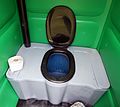
Inside a mobile toilet toilets:paper_supplied=yes/no
.jpg)
_02.jpg)
