Proposal:Harbour
| Harbour | |
|---|---|
| Proposal status: | Abandoned (inactive) |
| Proposed by: | * |
A harbour (also port, North American English Harbor) is a place where ships, boats, and barges can seek shelter from stormy weather. This article describes some of the many features associated with a harbour and the approach from the sea.
Sample harbour

- Rock coast
- Natural jetty
- Stone coast
- Footbridge or raft
- Slipway
- Quay
- Bollard
- Gate
- Dry dock, tidal harbour
- Pier
- Anchorage
- Sandy beach
- Beach
- Stone jetty
- Harbour jetty with pier inside
- Harbour jetty with rock fill outside
- Coastline
- Harbour as a node
Mapping a harbour
The harbour node
| de | Hafen |
| en | harbour, port |
| fr | port |
| it | porto |
| en_us | harbor |
| nl | haven |
Every harbour should be marked with node tags to which all related properties are assigned as detailed below.
A large harbour will also have a area using landuse=harbour and this may also be divided into several harbour basins which many have their own names. If, in a large harbour, there are several harbour basins designated for a specified uses, then each harbour basin can be tagged with its own icon. Please only tag harbours with international or nationwide importance as main-harbours. Main-harbours are also shown in lower zoom levels.
The harbour basin is surrounded by jetties or piers but should not be tagged as a separate area of water. To contain that many properties a new namespace harbour: is used.
Name
The name=* should be the set to the official name for the harbour in the local language. An alternative name can be put in alt_name=*. Names in other languages can be put in name:de, name"en, name:fr etc.
| name | International spelling as shown in World Port Source. Examples: "Lubeck", "Hongkong", "Copenhagen" |
|---|---|
| namenational | National spelling in national lettering. Examples: "Lübeck", "香港", "København" |
Also:
| Harbour area | landuse=harbour |
| Marina area | leisure=marina |
| Marine base | military=naval_base |
| Boatyard | waterway=boatyard |
| Construction dock | waterway=dock |

Container harbour
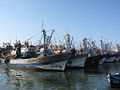
Fishing harbour

Oil terminal
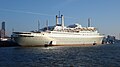
Passenger terminal

Marina

Naval base
Anchorage


The harbour area
The harbour site (land area, not area of water ), mostly fenced or outlined by hedge, barrier or access restriction is tagged on land using landuse=harbour. It should include: dry anchorage, car parks, service buildings, dockyard, storages, container handling area, garages, sanitation, etc and also various associated facilities including: restaurant, clubhouse, supermarket, ship chandler, etc., as long it is inside of premises.
All fixed walls associated with a harbour should be mapped as being part of the natural=coastline or waterway=riverbank. These include external and internal harbour wall, wharfs, for every masonry pier and unfortified shores. Lighter elements, such as footbridges, rafts, landing-stages are deemed to be part of the sea rather than defining te edge of the sea.
The coastline can be divided into separate segments with appropriate tagging, a pier may, for example, have two different tags on either side.
natural=coastline
+ material=*     ( concrete | masonry | boulder | tripode | steel | wood )
+ mooring=*      (Landing for …)

| Concrete | material=concrete |
| Brickwork | material=masonry |
| Boulders | material=boulder |
| Tripode | material=tripode |
| Steel wall | material=steel |
| Wooden planks | material=wood |
Associated features
A harbour contains and has many associated features. Here are details of some of them:
Amenities
Harbour relevant facilities e.g.:
- harbour master (amenity=harbourmaster)
- customs
- ship fuel station (amenity=fuel)
- drinking water (amenity=drinking_water)
- trash disposal (amenity=waste_disposal)
- oil recycling
- toilets (amenity=toilets)
- boat storage (amenity=boat_storage)
Breakwater
| de | Wellenbrecher |
| en | groyne, breakwater |
| us | |
| fr | brise-lames |
A breakwater is a solid or nearly solid structure used to reduce the power of the waves within a harbour or to reduce coastal erosion. A breakwater in OSM is defined as "stand alone" (no connection to the shore - if a wave protection building is connected to shore, see Groyne). It is not normally possible to to walk on a breakwater and that are not used to access moored boats. Use man_made=breakwater.
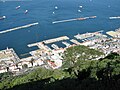
Gibraltar

With beacon

Almost submerged


Dolphin

A dolphin is structure made of wood, metal (sometimes with hard rubber covering) or concrete sticking out of shallow water which can either serve as markings of navigational channels to mark shoals or as an extended mooring for vessels to extend a pier. Proposed tagging for a mooring 'dolphin' is as a node with seamark:type=mooring ; seamark:mooring:category=dolphin
Entrance
The harbour entrance is how boats and ships enter the harbour. This is not explicitly tagged but is likely to have navigation bouy=*s nearby and may be formed from a combination of the natural=coastline and man_made=breakwaters.
Groyne
| de | Buhne |
| en | groyne |
| us | groin |
| fr | épi |
A groyne is a timber structure or a linear pile of rocks stretching across a beach a short distance into the sea to reduce erosion. These should be tagged with man_made=groyne.

Groyne at the beach

Stone groyne

Groyne in the tidelands


Mooring
A mooring is a place where boats can be fastened to a fixed object such as a bollard, pier, quay or the seabed and should use mooring=*. Moorings may be alongside a man_made=pier, on a sea wall or as a floating mooring buoy=* attached to the seabed. The mooring tag should be added to the relevant feature. In the case of a sea wall then the natual=coastline itself can be used. Do however be very careful when doing anything to the coastline as it can cause difficulties if the coastline gets broken.
| Mooring allowed | mooring=yes |
| Ferry/regular service | mooring=ferry |
| Round trip/cruise | mooring=cruise |
| Mooring for guests | mooring=guest |
| Declaration | mooring=declaration |
| Mooring with sign occupied/vacant | mooring=redgreen |
If it is a permanent anchorage it can be complemented with the name of the vessel mooring:name=* respectively mooring:operator=* for the operator.
Pier
| de | Pier |
| en | jetty |
| us | |
| fr | môle |
A pier (also jetty, landing stage, footbridge) is a wooden or other solid structure on metal,wooden or concrete legs or floating which is used for the mooring, loading and unloading of vessels. Larger pier can include buildings and possibly amusement arcades all build on columns out over the sea. Piers should be tagged using man_made=pier. Use a linear way for narrower ones used to access boats and areas for larger piers with buildings. A floating=yes if the structure floats on the water

A floating raft

Footbridge with Pontoon

A large structure with amusement arcades

A landing stage on a lake


Quay
| de | Kai |
| en | quay |
| us | quay |
| fr | quai |
| nl | kade |
A quay is a length of coast designed to allow vessels of some size to moor alongside the shore. In an industrial harbour a quay may have cranes and facilites to unload cargo. For passenger vessels it may have facilities for passengers to embark. A quay will normally be tagged as part of the coastline natural=coastline.
In a scheme analogous to man_made=pier, a quay may be modeled by tagging a section of the natural=coastline as man_made=quay.
Taginfo page for man_made=quay
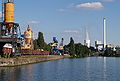
Industrial quay

Wall of the quay

Quay

Promenade


Slipway
| de | Rampe, Slipanlage |
| en | ramp, slipway, slope, ascent |
| us | |
| fr | rampe |
A slipway is used to launch a vessel and consists of a ramp or a carriage on rails. It continues under water until the water depth is reasonable. Tag with leisure=slipway and optionally also operator=* and operating=* ( hand | car | cable_winch | travellift ). Further information:o Ship launching, boat lift, Travellift
| Hand drive, carriage | operating=hand |
| By car, boat trailer | operating=car |
| Cable winch | operating=cable_winch |
| Travellift | operating=travellift |
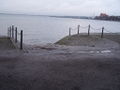
Ramp

Slipway


Pontoon
| de | Ponton |
| en | pontoon |
| us | |
| fr | ponton ; barge |
A pontoon is a huge anchored harbour facility or a moving swimming, sometimes self driving working platform.
-- Question: should we map moving things? I suggest we only do if in practice it does not move. What tagging should be used for this feature? PeterIto 00:12, 8 June 2011 (BST)
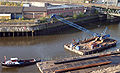
Pontoon with crane

Routes
_Ferry_Cuxhaven_-_Brunsb%C3%BCttel_1999_by-RaBoe_01.jpg)


Only permanent routes are mapped. They begin at the start harbour via stopover harbours to the harbour of destination. More than one route on a passage is connected between the junctions to one node.
| Ferry route | route=ferry + name=* |
Preset "Harbour" for JOSM
For Editor JOSM we have comfortable preferences for editing all relevant objects in harbours. The preferences are very detailed; the user can edit the most important data like a checklist.
To use the "Harbour" preferences:
- start JOSM and press
key <F-12> - click on the left side the
"coordinate grid" icon(3rd icon from top: "Settings for the map projection and data interpretation.") - click on the top on
"Tagging Presets" tab - highlight in the lower window "Harbour", click
"Activateand"OK"
By doing this, the preferences "Harbour" will be copied in the upper window. - start JOSM again. The preference "Harbour" you will now find in JOSM-menu under "Preferences".
Other resources
World Port Index
The World Port Index contains 4300 harbours in 400 regions. Every harbour has a 5-digit number as index. NGA World Port Index.
See also
- OpenSeaMap (Example rendering of a sea chart)
- World Port Index National Geospatial Intelligence Agency
- UN/LOCODE United Nations Location code
- OpenSeaMap/Harbours
| ||||||||||||||||||||||||||||||||||||||||||||||