


OsmAnd

| OsmAnd | ||||||||||||||||||||||||||||||||||||||||||||||||||||||||||||||||||||||||||||||||||||||||||||||||||||||||||||||||||||||||||||||||||||||||||||||||
|---|---|---|---|---|---|---|---|---|---|---|---|---|---|---|---|---|---|---|---|---|---|---|---|---|---|---|---|---|---|---|---|---|---|---|---|---|---|---|---|---|---|---|---|---|---|---|---|---|---|---|---|---|---|---|---|---|---|---|---|---|---|---|---|---|---|---|---|---|---|---|---|---|---|---|---|---|---|---|---|---|---|---|---|---|---|---|---|---|---|---|---|---|---|---|---|---|---|---|---|---|---|---|---|---|---|---|---|---|---|---|---|---|---|---|---|---|---|---|---|---|---|---|---|---|---|---|---|---|---|---|---|---|---|---|---|---|---|---|---|---|---|---|---|---|
  | ||||||||||||||||||||||||||||||||||||||||||||||||||||||||||||||||||||||||||||||||||||||||||||||||||||||||||||||||||||||||||||||||||||||||||||||||
| Author: | Victor Shcherb and contributors | |||||||||||||||||||||||||||||||||||||||||||||||||||||||||||||||||||||||||||||||||||||||||||||||||||||||||||||||||||||||||||||||||||||||||||||||
| License: | GNU GPL v3 and artwork and design elements CC-BY-ND-NC (free or 24.99 €) | |||||||||||||||||||||||||||||||||||||||||||||||||||||||||||||||||||||||||||||||||||||||||||||||||||||||||||||||||||||||||||||||||||||||||||||||
| Platforms: | Android and iOS | |||||||||||||||||||||||||||||||||||||||||||||||||||||||||||||||||||||||||||||||||||||||||||||||||||||||||||||||||||||||||||||||||||||||||||||||
| Status: | Active | |||||||||||||||||||||||||||||||||||||||||||||||||||||||||||||||||||||||||||||||||||||||||||||||||||||||||||||||||||||||||||||||||||||||||||||||
| Version: | 5.0.5 releases (2025-04-17) | |||||||||||||||||||||||||||||||||||||||||||||||||||||||||||||||||||||||||||||||||||||||||||||||||||||||||||||||||||||||||||||||||||||||||||||||
| Languages: | English, Russian, German, French, Arabic, Bulgarian, Bosnian, Czech, Danish, Spanish, Basque, Finnish, Hebrew, Hindi, Hungarian, Armenian, Indonesian, Italian, Japanese, Georgian, Korean, Italian, Latvian, Marathi, Dutch, Norwegian, Polish, Portuguese, Brazilian Portuguese, Romanian, Slovak, Serbian, Swedish, Ukrainian, Vietnamese, and Chinese
| |||||||||||||||||||||||||||||||||||||||||||||||||||||||||||||||||||||||||||||||||||||||||||||||||||||||||||||||||||||||||||||||||||||||||||||||
| Website: | https://osmand.net | |||||||||||||||||||||||||||||||||||||||||||||||||||||||||||||||||||||||||||||||||||||||||||||||||||||||||||||||||||||||||||||||||||||||||||||||
| Install: | ||||||||||||||||||||||||||||||||||||||||||||||||||||||||||||||||||||||||||||||||||||||||||||||||||||||||||||||||||||||||||||||||||||||||||||||||
| Source code: | osmandapp/Osmand GitHub | |||||||||||||||||||||||||||||||||||||||||||||||||||||||||||||||||||||||||||||||||||||||||||||||||||||||||||||||||||||||||||||||||||||||||||||||
| Programming languages: | Java and C++ | |||||||||||||||||||||||||||||||||||||||||||||||||||||||||||||||||||||||||||||||||||||||||||||||||||||||||||||||||||||||||||||||||||||||||||||||
|
Navigation (routing) offline and online, OSM and custom map display (vector data or tiles, offline, cached or online), POI and address search (offline or online Nominatim), submit OSM bugs and POI, mark favorites, public transport info. Actively being developed. Keywords: GPS navigator, GPS navigation, navigation system, satellite navigation, sat nav, satnav, GPS tracker, GPS tracking, GPS map, OpenStreetMap, OSM viewer, map viewer, OSM mapping, offline routing, offline world map, global offline country maps, outdoor. |
||||||||||||||||||||||||||||||||||||||||||||||||||||||||||||||||||||||||||||||||||||||||||||||||||||||||||||||||||||||||||||||||||||||||||||||||
| ||||||||||||||||||||||||||||||||||||||||||||||||||||||||||||||||||||||||||||||||||||||||||||||||||||||||||||||||||||||||||||||||||||||||||||||||
OsmAnd is a GPS Navigation and map application that runs on many Android and iOS smartphones and tablets, featuring optional offline maps and turn by turn directions. OsmAnd is a collaborative, open source (GPL) software project that incorporates the 100% free OpenStreetMap data to deliver a complete, user-friendly, mobile GPS solution. Rich mapping, navigation, routing, Points Of Interest (POI), and historical tracking functions are all well supported. The software is well refined, reliable, globally deployed, and runs on many Android and iOS based smartphones, tablets, and a wide array of Linux-based systems.
Frequently updated map and POI data are typically downloaded beforehand and stored on the navigation device. Subsequent use does not require an Internet connection, which allows unlimited usage without incurring potentially costly data transfer charges. It also offers uninterrupted and unfettered GPS reliability despite degraded or non-existent cellular phone network signal coverage.
OsmAnd and OSM data extend well beyond typical GPS functionality. Geodemographic information from Wikipedia and other sources may be integrated as a POI shown on the mobile maps. Map detail (stored as vectors and polygons) and POI data are often much richer than other off-the-shelf, typically closed and static GPS systems. Best of all, the entire system, the map data and software used to manipulate and display it, are crowdsourced. Any user, with an easy two-minute or less, totally free registration, can correct OpenStreetMap errors, add enhanced POI data, report an OsmAnd software bug, or suggest a potential enhancement. As mobile GPS needs evolve the OsmAnd / OpenStreetMap integrated solution quickly responds and remains current.
Download & installation
Most users should use their preferred software supplier (e.g. App Store or Market) for convenience and automatic updates.
Free version
| Worldwide | F-Droid | Free |
| Worldwide | Google Play | Free |
| Worldwide | iTunes App Store | Free |
Non-free version
| Region | Service | Price |
|---|---|---|
| All | F-Droid | Free |
| EU | Amazon (various) | € 19.99[1][2][3][4] |
| EU | [1] | € 24.99 |
| JP | [2] | ¥ 2,500 |
| UK | [3] | £ 19.99 |
| USA | [4] | $ 14.99 |
| USA | Amazon Digital Services | $19.99 |
Language support includes: Arabic, Chinese, Czech, Dutch, English, French, German, Greek, Hebrew, Hindi, Italian, Japanese, Korean, Polish, Portuguese, Russian, Spanish, Tagalog, Vietnamese (There may be more, this list expands rapidly.)
OsmAnd has limited availability, free of charge. If you opt for a free version please support the project in another way, such as purchasing merchandise.
- OsmAnd: Latest market release, with two limitations: only 7 local downloads of maps, and no Wikipedia place data as POI;
- OsmAnd~: No limitations (except OsmAnd Cloud data backup), maintained by F-Droid, built reproducibly (i.e. guaranteed to match with the source code).
- Build OsmAnd: Build the app yourself for manual installation. (This package can be unstable or experimental, and manual installations are not auto-updated.
For more OsmAnd versions and other projects, see OsmAnd's official downloads page.
OpenStreetMap map data and the OsmAnd application
OpenStreetMap (map data and server side components) and OsmAnd (Android / Java software for mobile use and navigation) are two large, open projects, therefore support concerns need to be initially divided between OpenStreetMap "data" issues, and OsmAnd "software" issues. For instance, problems with the underlying map data (key and value omissions, way connection errors, inconsistencies, etc.) can cause OsmAnd to navigate inefficiently and miss the very best routes. Once the underlying map data is completely cleansed or fully complete OsmAnd software should produce expected results.
The OsmAnd rendered map data files are frequently updated, and each update typically has hundreds if not thousands of corrections and additions. Likewise, Points of Interest (POI) data in particular requires constant vigilance to remain relevant and accurate with numerous organizations moving, or going in or out of business each month. Supplying correcting map information to the OpenStreetMap organization is very easy. You can simply just report problems, and that by itself is very helpful. Or you can actually roll up your sleeves and edit the map data directly. After registering (a simple, two-minute process) you can use the free, very simple to use programs to edit the underlying data directly.
Please do your share of the hard work it is to keep the underlying OpenStreetMap data in pristine condition.
OsmAnd does not use the OpenStreetMap standard tile layer (also known as openstreetmap-carto) to generate its maps, so bugs related to maps rendered for OsmAnd do not belong there. OsmAnd uses its own tile render generation routines, generally defined in the OsmAnd-resources GitHub project.
OpenStreetMap support and help (data and server)
- FAQ - Frequently Asked Questions.
- Wiki - for more comprehensive documentation.
- Forum - great for discussion and peer support. See also Help Desk.
- Help Desk - great for brief, pointed Q&A not covered elsewhere.
- Mailing Lists - extensive ongoing discussions. Broken down by country and topical area.
OsmAnd Support
OsmAnd is a large software project with millions of users worldwide. Relatively few people actually do the work to provide virtually everyone with a great application, built upon great data. If you have a support issue and resolve it through a convoluted, time consuming process, please go back and help update the FAQ, the Wiki, the Forum pages, etc. and make the path from support question to satisfactory answer as straight as possible. Make it much easier for the next person with the same issue to get to the solution. Help the coders document and best express the program's features, and explain all the typical use-cases. If you have Java programming experience by all means refactor, streamline and better document the running code, add well tested new features, and take it upon yourself to tackle any open item on the Issue List.
High quality, timely support requires many hands to make light lifting. Please pitch in and contribute to OsmAnd's on-going support needs in any way you can.
Help for OsmAnd users
- The OsmAnd Home Page OsmAnd's official website. Information includes a feature overview, news blog and extensive, maintained help pages.
- The official OsmAnd wiki You will notice that this link redirects to the page you are reading. Years ago, other sites (such as Google Code) hosted wiki information, but as of 2015, all old wiki resources (Google Code, Github, etc.) point to this location.
- Google Groups Forum (Osmand) Great for peer support. This is also a great place to discuss bugs and feature requests.
Help for OsmAnd coders and programmers
- There are two, equally important OsmAnd code bases:
- Osmand-java A pure Java, maximum cross-platform library, which is not Android specific. No Android libraries are used here.
- Osmand The Android specific version. Use of various Android libraries, and the measured integration of constantly evolving Android GUI features are very much encouraged.
- Help and Technical Articles, whose source code is version controlled at GitHub.
- Application GitHub Issue Tracker admitted bugs & feature request tracker
Features
OsmAnd is a map and navigation application with access to the free, worldwide, and high-quality OpenStreetMap data. All map data can be stored on your device's memory card for offline use. Via your device's GPS, OsmAnd offers routing, with visual and voice guidance, for car, bike, and pedestrian. All the main functionalities work both online and offline (no internet needed when navigating).
OsmAnd+ is the pay-version of the app. By buying OsmAnd+ you support the project and development of new features.
Some of the main features:
- Works online (fast) or offline (no roaming charges when you are abroad)
- Turn-by-turn voice guidance (recorded and synthesized voices using TalkBack)
- Optional lane and turn lane guidance (using
destination=*andturn:lanes=*), street name display, and estimated time of arrival - Supports intermediate points on your itinerary
- Automatic re-routing whenever you deviate from the route
- Search for places by address, by type (e.g.: restaurant, hotel, gas station, museum), by geographical coordinates, or along the route
- Mark road as impassable per session
Map viewing
- Display your position and orientation on the map
- Optionally align the map according to compass or your direction of motion
- Save your most important places as Favorites
- Display POIs (point of interests) around you
- Can display online tile maps
- Can display satellite view (from Bing)
- Can display different overlays like touring/navigation GPX tracks and additional maps with customizable transparency
- Optionally display place names in English, local, or phonetic spelling
- Different mappaint styles
Strong Wikipedia Integration
- High quality information from the two best collaborative projects of the world: OpenStreetMap and Wikipedia.
- Great for touring, sightseeing, and historical backgrounding. Discover new information about the places right around you, or around your family, relatives, associates, etc., even abroad.
- Rapidly become locally acclimated.
- Great way to liven up long trips, learning about the numerous interesting places right along your route.
- Wikipedia server sites tag millions of places around the world with geo tags (latitude/longitude coordinates), these often include cities, towns, villages, historic places, museums, civic centers, etc.
- OsmAnd Plus (the low cost paid version) includes unlimited map downloads and unlimited downloads of condensed Wikipedia place data files, formatted for immediate use in OsmAnd plus map files as Points of Interest (POI)
- Wikipedia places (when downloaded and enabled in OsmAnd plus under Configure Map, POI, Wikipedia (offline)) show up on maps as unobtrusive circles with W inside.
- Briefly touch a W and get a one-line description of that Wikipedia place
- Touch a W a bit longer the name pops up inside a small gray box. Then, just:
- tap the red X to remove that pop up, or
- tap anywhere inside that gray box to bring up a new comprehensive menu. Select either:
- Show POI description This brings up several sentences, sourced from Wikipedia, describing the place. An Internet connection is NOT required, and no data charges will ever accrue.
- Show POI Website this option will take you (via the browser of your choice) directly to the relevant Wikipedia article page. (An Internet connection is required, and your provider may charge you their data transport fees.)
- It's very easy to set the selected POI location as a destination, get directions, save to a favorite for use later, etc.
- Wikipedia places are constantly being updated. Coverage in many areas is outstanding.
- Wikipedia POI files (places) are currently available by Wikipedia site language and not limited by geographic region.
- For example the English Wikipedia file includes places found in the English language Wikipedia servers, including USA, UK, Canada, much of English speaking EU, etc. It also includes coverage of non-English speaking places to the extent they are included in the English language Wikipedia site. (For example the English language Wikipedia covers Paris, Hong Kong, Berlin and many other places throughout the world, discussing those places in English.)
- Wikipedia files can be quite large. The English Wikipedia file is about 300 MB to download and expands to about 1 GB when decompressed.
- These files (and all the OsmAnd map files) may typically be run from your main, or SD memory storage, or from an auxiliary (add-on) memory card (provided your device has a slot for one and most do), even if you do not have root access to your Android operating system. Where the files are stored is easily configured via a menu option, and the software will effortlessly move any existing downloaded files to a new location you choose.
Safety features
- Optional automated day/night view switching
- Optional speed limit display, with reminder if you exceed it
- Optional speed-dependent map zooming
- Share your location so that your friends can find you
Bicycle and pedestrian features
- The maps include foot, hiking, and bike paths, great for outdoor activities
- Special routing and display modes for bike and pedestrian
- Optional public transport stops (bus, tram, train) including line names
- Optional trip recording to local GPX file or online service
- Optional speed and altitude display
- Display of contour lines and hill-shading (via additional plugin)
Elevation data is not (yet) used for routing but may be considered when using an external routing engine such as BRouter
Nautical features
- Special routing and display modes for boats
- Optional display of whitewater routes
Directly contribute to OpenStreetMap
- Report map bugs
- Upload GPX tracks to OSM directly from the app
- Add POIs and directly upload them to OSM (or later if offline)
- Optional trip recording also in background mode (while device is in sleep mode)
OsmAnd is open source and actively being developed. Everyone can contribute to the application by reporting bugs, improving translations, or coding new features. The project is in a lively state of continuous improvement by all these forms of developer and user interaction. The project progress also relies on financial contributions to fund the development, coding, and testing of new functionalities. By buying OsmAnd+ you help the application to be even more awesome! It is also possible to fund specific new features, or to make a general donation on osmand.net.
Strengths and weaknesses
Strengths
- Open Source (GNU GPL Version 3), although some features are not free and visual elements are CC BY-NC-ND 2.0[5]
- Possibility to use and edit maps completely offline and no time use limitations, like google maps for example
- Store for offline use vector maps and raster satellite images from various sources
- No ads, except one suggesting to buy paid version in configuration to get some paid features
- No trackers, although it has some analytics off by default, the user has the option to share with developers: only downloaded maps and screens visited. No location and position data is ever shared.
- No abusive permission requests, only ask permissions to use the related resource like: GPS location to use it, storage access to save maps, internet access to download maps, camera access to take photos, audio access to record audio...
- Very good customizable options shown during navigation like lanes, radar, max speed...
- Shows Wikimedia Commons and Mapillary images in POIs (only online)
- Can store offline maps and other data in SD card in Android version[6]
- In POI details: quick phone call with just 2 taps, search nearby similar POIs, email and HTTP links, copy coordinates in 7 formats
- Also available in Android Go, an Android version for low resource devices, although the vector maps view is slow
- Save photo, video and audio notes[7]
- Add quickly a POI with certain configured tags (fixed tags and fixed values or fixed tag and values prompt to enter data)[8]
- Quick and simple upload changes to OpenStreetMap (POIs, notes and tracks)
- Support radar POIs/nodes and radar relations
Weaknesses
- No live traffic data
- No 3D view
- Limited voice instructions in embedded pre-recorded voices, but synthesized TTS (text to speech) voices can be used and are better maintained[9]
- Very confusing options and configurations although it has a "clean" main screen interface
- Slow in some older smartphones
- Limited support to areas (can edit only tags in some areas) and relations (only shows route relations associated to POIs)
- A bit limited in some edits to upload to OpenStreetMap like: no tag presets, no edits in way tags
- Limited in very long routes in offline app calculation, like 200km or more, although possible with Third-party routing (BRouter) [10]
- Always shows the best route according to configuration like avoid tolls, unpaved roads, but not alternative routes
Some advanced fragments of information about OsmAnd offline vector map data
- offline map data files that can be used with OsmAnd have *.obf as file extension.
- in latest versions of these map files all vector map data, POIs and address indexes for offline search are included.
- you can generate your own *.obf files by using OsmAndMapCreator.
- when you have several *.obf files for single regions of a certain country, you can combine them with inspector.bat or inspector.sh that is delivered with OsmAndMapCreator. Start this script on a command line without any parameters to see all options and proceed.
- Maybe there is a named street in the OSM data, but OsmAnd cannot find it via its offline address search? Run the above mentioned inspector with parameter -v and [nameofyourmapfile].obf >list.txt ... this will give you a text file with all places that are within that obf file and all streets that are associated to that place. Thus you can find out whether OsmAnd's street list is incomplete (this can have several reasons like missing administrative borders etc.).
Examples of OSM POI categories supported in OsmAnd
Wherever OpenStreetMap POI categories are known to be rendered and/or searchable in OsmAnd, its corresponding key or tag page should indicate that OsmAnd supports it.
- food (bar, bbq, biergarten, cafe, drinking_water, fast_food, food_court, pub, restaurant)
- education (college, kindergarten, library, school, university)
- emergency (access_point, ambulance_station, fire_extinguisher, fire_flapper, fire_hose, fire_hydrant, fire_station, phone, police, ses_station, siren)
- transportation (bicycle_parking, bicycle_rental, bus_station, car_rental, car_sharing, car_wash, ferry_terminal, fuel, grit_bin, parking, taxi)
- finance (atm, bank, bureau_de_change)
- healthcare (baby_batch, dentist, doctors, first_aid, hospital, pharmacy, veterinary)
- entertainment (architect_office, arts_centre, brothel, cinema, community_center, fountain, nightclub, sauna, stripclub, studio, theatre)
- tourism (alpine_hut, artwork, attraction, camp_site, caravan_site, chalet, guest_house, hostel, hotel, information, motel, museum, picnic_site, theme_park, viewpoint, zoo)
- historic (archaeological_site, battlefield, boundary_stone, castle, fort, memorial, monument, ruins, wayside_cross, wayside_shrine, wreck)
- natural (bay, beach, cave_entrance, cliff, coastline, fell, glacier, heath, land, marsh, mud, peak, sand, scree, scrub, spring, stone, tree, volcano, water, wetland)
- shop (alcohol, bakery, beauty, beverages, bicycle, books, boutique, butcher, car, car_repair, charity, chemist, clothes, computer, confectionery, deli, department_store, doityourself, dry_cleaning, electronics, fabrics, farm, florist, funeral_directors, furniture, garden_centre, general, gift, glaziery, greengrocer, hairdresser, hardware, hearing_aids, hifi, ice_cream, jewelry, kiosk, laundry, mall, massage, money_lender, motorcycle, newsagent, optician, organic, outdoor, pawnbroker, second_hand, shoes, sports, stationery, supermarket, tattoo, toys, travel_agency, variety_store, video)
- leisure (common, dance, dog_park, fishing, garden, golf_course, ice_rink, nature_reserve, marina, miniature_golf, park, pitch, playground, sports_centre, slipway, stadium, track, water_park)
- sport (10pin, archery, athletics, australian_football, baseball, basketball, beachvolleyball, boules, bowls, canoe, chess, climbing, cricket, cricket_nets, croquet, cycling, diving, dog_racing, equestrian, football, golf, gymnastics, hockey, horse_racing, ice_stock, korfball, motor, multi, orienteering, paddle_tennis, paragliding, pelota, racquet, rowing, rugby, shooting, skateboard, skating, skiing, soccer, swimming, table_tennis, team_handball, tennis, toboggan, volleyball)
- other (bench, clock, courthouse, crematorium, embassy, emergency_phone, fire_hydrant, fire_station, grave_yard, hunting_stand, internet_access, marketplace, place_of_worship, police, post_box, post_office, prison, public_building, recycling, shelter, telephone, toilets, townhall, vending_machine, waste_basket, waste_disposal)
Contribute to OSM via OsmAnd
OsmAnd supports directly contributing to the OSM database, both online and offline. Corrections are either uploaded to the OSM database instantly, or in offline mode, must be manually uploaded later. Map updates through OsmAnd Live are available free to OpenStreetMap contributors who meet a minimum of contributions.
First, you will need to register with OSM.
Then, in OsmAnd go to Menu > Plugins and activate OSM Editing plugin.
Finally, go to Menu > Plugins > OSM editing > Settings and enter your account data (OSM user name and password).
To add a POI
- Tap (long tap) on a location on the map you want the POI to appear.
- Tap on "Actions".
- Select "Create POI".
- Select a POI type.
- Type in the information in each of the fields.
- To add more advanced tags:
- Select "Advanced Mode".
- Select "Add Tag".
- Type "A" in the tag box. You can't see the whole field, so you just have to remember what spot each value is in.
- Type the value in.
- Finally tap "Save".
- You can select your added POI now and tap "Upload" to directly send the POI to OSM.
If you want to add more than one POI and upload afterwards, this is also possible. Add the POIs you want to the map and not upload them directly. To upload all POIs you have create, tap on Menu > My Places. Switch to the tab "OSM Edits". Here you can select all POIs you want to send to OSM and upload them.
To edit a polygon
[this section is empty or needs expanding]
See issue 5595.
To record and submit GPX tracks
- Go to Menu > Plugins and activate the Trip recording plugin.
- Go to the map and tap the button labeled REC in the top-right corner of the screen, next to the button with the satellite dish. This will start recording your trip.
- When you have finished your trip, tap the button again to stop recording.
- Go to Menu > My Places > Tracks.
- Find the recorded track, and tap on it to get its menu and tap on Options (3 dots on right hand side)
- Select Upload to OpenStreetMap
- Edit details if required and tap Upload
Using JOSM instead to edit and submit the data entered in OsmAnd
First you need to connect your phone via cable/Wi-Fi/Bluetooth/NFC or connect the microSD card (if OsmAnd is configured to save data on the card) to your computer. Then import the files in your operating system file manager from (in microSD card or internal storage, according to OsmAnd configuration):
- Tracks - Android > Data > net.osmand.plus > files > avnotes
- Photos - Android > Data > net.osmand.plus > files > tracks > rec ("rec" is the default folder, you can customize it)
- Favorites - Android > Data > net.osmand.plus > files > favorites
- Audio notes
- Video notes
Then you can drag and drop the files to JOSM. The photos are indicated by an icon that you can click on to see the photo.
- OSM POIs and OSM notes/bugs - In this case you must first export the data in OsmAnd: "Hamburger menu > My Places > OSM EDITS > Share button (in the middle at the bottom) > choose POI, OSM notes or All data (POI and OSM notes) > GPX file > choose an Android/iOS file manager if you have one available in this screen (this part is tricky, you may have other options like "share in vicinity") and then choose the location to save the file. The default name is "osm_notes_modification.gpx". To make it easier, after importing this file to JOSM you can see 2 layers, select "osm_notes_modification.gpx marks", right-click on it and choose in the context menu "Convert to data layer". Now you can select each POI and copy the data to the OSM data layer. It is advisable not to send this imported layer directly to OpenStreetMap unless you know what you are doing! Note that each of these POIs has an additional tag besides you entered data, such as "description=id: -1573 note create" which should be ignored/not sent to OSM.
Screenshots
- OsmAnd for Android
-
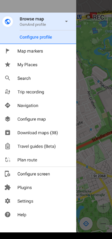 Main menu
 -
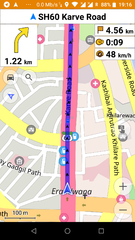 Car navigation
 -
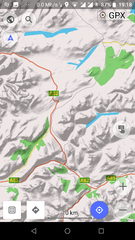 Map with hillshades layer
 -
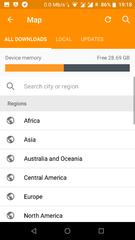 Download offline maps
 -
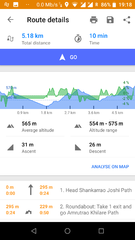 Route details
 -
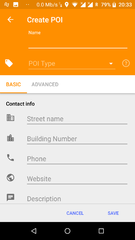 Modify/create POIs (offline)
 -
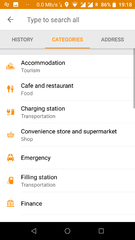 General Search (offline - osmand supports nomintim searches too)
 -
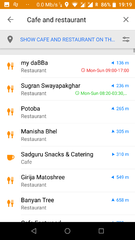 Nearby POI with opening hours
 -
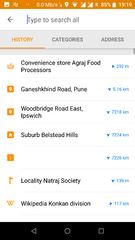 Search history
 -
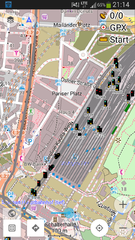 Railway signals from OpenRailwayMap as an overlay
 -
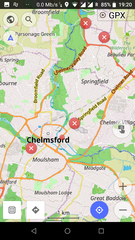 See/edit OSM bugs


- OsmAnd for iOS
-
 2D overview map
 -
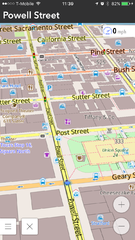 3D overview map
 -
 Search results


Customizing OsmAnd
Create your own maps
See the help topic Create Offline Raster & Vector Maps and OsmAndMapCreator
Adding more 'online' maps
By enabling the plugin "Online maps", you can add more maps and download them in OsmAnd cache:
- Enable plugin "Online maps" in settings
- Open "Configure map"
- Click "Online map..."
- Instead of the default "OSM vector map", choose another map or choose "install more..." or "Add".
- Done. Note that you can use those "online map" as layers on top or behind the default OSM vector map.
To download a map in cache, chose the online map you want. Then on the map click and choose "download" in the action menu.
Here is a list of resources with some online maps that you can add in OsmAnd:
- A GitHub repo with a list of "Online maps"
- Add Google Traffic Overlay in OsmAnd
- Same overlay with only the Traffic info: https://mts0.google.com/vt/lyrs=h,traffic&x={1}&y={2}&z={0}&style=3 (Source)
- AnyGIS offers a list of Online maps for OsmAnd
Custom rendering style
OsmAnd already contains a number of specialized Map styles, from the map screen check them out by tapping the menu button, select "Configure Map", then "Map Style", examples are the "Touring view" map style allowing some advanced options for options for hiking and bike tours, or the "Winter and ski" map style for skiing trips.
You may also define your own map style. This is a bit involved, please check out our forum, our HowTo pages, and start from the default rendering template. Edit the file as you wish, rename it XXX.render.xml and place it on your device under /sdcard/osmand/rendering. Then in OsmAnd select XXX under "Map style".
Adding rendering styles created by the community
This GitHub project provides more rendering styles ready to be imported into OsmAnd:
Custom Routing Parameters
Just as with rendering, it is possible to change the parameters used by the routing engine. This can be done by editing routing.xml and placing it next to the maps. This is all documented in the original routing.xml.
Desktop Viewer for OsmAnd maps
An early version of a Desktop viewer for OsmAnd maps can be downloaded from Sourceforge: https://sourceforge.net/p/offroadosm/wiki/Home
Resources and external links
- OsmAnd Home Page
- OsmAnd Map - Web map, navigation, weather
- OsmAnd Webmap Viewer
- OsmAnd Google Groups Forum
- Issue Tracker
- Source code
- OsmAnd Local Indexes List: Links to .obf maps for download
- Using Osmand on the road: blog post about setting up Osmand on your smartphone
- Bicycle GPS project
- BBBike.org extract service offers OsmAnd maps for an area of your choosing, weekly updates
- #osmand:hacklab.fi matrix chat channel
References and notes
- ↑ OsmAnd+ page in Amazon Spain
- ↑ OsmAnd+ page in Amazon Germany
- ↑ OsmAnd+ page in Amazon France
- ↑ OsmAnd+ page in Amazon Italy
- ↑ OsmAnd source code
- ↑ How to move OsmAnd's home (maps) folder to the external SD card? (for Android version only)
- ↑ Audio/video notes plugin
- ↑ Quick Action Button
- ↑ What is the difference between TTS (text to speech) and recorded voices?
- ↑ How to calculate routes longer than 250km?
| ||||||||||||||||||||||||||||||||||