Fa:Editing Standards and Conventions

- برای پیشنهادهای عمومی بیشتر و پیشنهادهای تگگذاری، Fa:Good practice را ببینید.
متن زیر برخی از استانداردها و قواعد ویرایش نقشه است.
تگنویسی
- عوارض نقشه - رایجترین تگهای OSM
- راهنمای تگنویسی کشورها - قواعد تگنویسی مخصوص هر کشور یا ناحیه
- عوارض - دستهبندی تگها بر اساس هدف یا عملکرد آنها
- تگهای پیشنهادی - پیدا کردن تگ جدید و غیرمعروف
- فهرست کامل روشهای یافتن تگ
جادهها
در ابتدا، هندسهٔ جاده، خیابان، پیادهرو و... با یکسری از نقاط کشیده میشود که با یکدیگر راهی را تشکیل میدهند. سپس بایستی به آن راه تگ highway=* و نام داده شود.
اغلب راهها در ویرایشگرهای OSM شبیه به هم به نظر میرسند، با وجود این، بسته به تگهایی که دارند در زمان رندر شدن با رنگ و عرض متفاوتی نشان داده میشوند.
اسامی خیابانها و قواعد نامگذاری
 عارضه: Fa:Editing Standards and Conventions عارضه: Fa:Editing Standards and Conventions
|

|
| توضیحات |
| To provide details of the name for a feature included in OpenStreetMap. |
| برچسبها |
|
|
Names can be tagged using a range of name-related keys, with name being the most important. This key is set to the primary name of the feature in the real world. In general, the primary name is the most prominent signposted name or the most common name in the local language(s). This is the most obvious name of the feature — the one that end users expect data consumers to expose in a label or other interface element.
In addition to the primary name, objects very often have one or more alternative variants. In OpenStreetMap, such secondary names are classified by their function — how they are used in contrast to the primary name, or what purpose they serve for data users. Both primary and other name keys can be supplemented with a language code, such as en for English, zh for Chinese and hi for Hindi.
See the table with comments on these keys, and for a more detailed description and examples, refer to the dedicated pages for each of them.
Name keys
| Key | Element | Comment |
|---|---|---|
name=*
|
|
The common default name. Notes:
For details refer to Names#Good_practice. |
name[:✕✕]=*
|
|
Name in different language; e.g., name:fr=Londres. Note that all key variants below can use a language suffix. See: Multilingual names.
|
name:left=*, name:right=*
|
|
Used when a way has different names for different sides (e.g., a street that's forming the boundary between two municipalities). |
int_name=*
|
|
International name. Consider using language specific names instead; e.g., name:en=.... International does not (necessarily) mean English. It is used to give the name transliterated to Latin script in Belarus, Bulgaria, Greece, Kazakhstan and North Macedonia
|
loc_name=*
|
|
Local name. |
nat_name=*
|
|
National name. |
official_name=*
|
|
Official name. Useful where there is some elaborate official name, while a different one is a common name typically used. Example: official_name=Principat d'Andorra (where "name" is name=Andorra).
|
old_name=*
|
|
Historical/old name. |
ref_name=*
|
|
Unique, human-readable name of this object in an external data management system. |
reg_name=*
|
|
Regional name. |
short_name=*
|
|
Should be a recognizable commonly-used short version of the name, not an altogether different name (use alt_name for that), useful for searching (recognized by Nominatim). |
full_name=*
|
|
|
sorting_name=*
|
|
Name, used for correct sorting of names — This is only needed when sorting names cannot be based only on their orthography (using the Unicode Collation Algorithm with collation tables tailored by language and script, or when sorted lists of names are including names written in multiple languages and/or scripts) but requires ignoring some parts such as:
all of them being ignored at the primary sort level and not easily inferable by a preprocessing algorithm. |
alt_name=*
|
|
Alternative name by which the feature is known. If there is a name that does not fit in any of the above keys, alt_name can be used; e.g., name=Field Fare Road and alt_name=Fieldfare Road, or name=University Centre and alt_name=Grad Pad. In rare cases, the key is used for multiple semicolon-separated names; e.g. alt_name=name1;name2;name3, but this usage is not preferred.
|
nickname=*
|
|
Nickname (e.g. "Warschauer Allee" for BAB 2 in Germany 3140168 3140168). 3140168).
|
proposed:name=*
|
|
Proposed / future name for an element. |
name_1=*name_2=* |
Do not use this tag, suffixed name tagging for multiple values is deprecated. | |
bridge:name=*
|
|
Used to specify the name of a bridge where key:name is already used for the road on the bridge. |
tunnel:name=*
|
|
Used to specify the name of a tunnel where key:name is already used for the road through the tunnel. |
This table is a wiki template with a default description in English. Editable here.
Good practice
OSM follows the on the ground principle, which means that street names and other proper names are generally entered as they appear on signs, even if those names deviate from the general spelling rules. Possible exceptions are described in some of the following sections.
If you're wondering why how brands (McDonald's etc) have preset suggestions in iD, Every Door, and other apps, the answer is in the Name Suggestion Index. Here you can add presets for brands so they get uniform spelling and tagging.
Name is the name only
The name=* tag should be restricted to the actual name of the item. The first step is to determine whether the object actually has a name. Anything can be described by its type or category — for example: house, alley, park, pitch, lake, etc. However, not every such object has a  proper name. If something does not have a name, do not fill the
 name=* tag. Any additional information should be included in separate tags to identify its meaning.
Incorrect use of name=* |
Properly selected tags |
|---|---|
name=house
|
building=house
|
name=Mosque
|
amenity=place_of_worship, religion=muslim
|
name=football pitch
|
leisure=pitch, sport=soccer
|
name=unnamed street
|
highway=residential, noname=yes — see section #No name, below
|
name=alternate summit trail
|
highway=path, member of a route relation with |
Validators may detect and propose to remove the most obvious and common incorrect names, but undetected ones are also incorrect.
Names with generic terms
However, the examples above do not mean that a name cannot contain a type or describe an object. The official street name East 110th Street should also be recorded in name=*, despite the fact that the word east describes a relative location, and the words 110th and street are a number and a type.
Very often, in addition to the specific part, names also include a generic term. For example, Ho Chi Minh City, should remain intact even though the place is tagged place=city[1]. At the same time, New York City may be correct as the common name for The City of New York, but for a city named Manchester, do not add a descriptive City.
Some objects are actually named The Lake, or The Hill. In such cases adding it as a name is fine. For example, The LakeThe Lake in New York City’s Central ParkCentral Park is tagged with name=The Lake and not a constructed name like Central Park Lake.
Invented and real names
Constructing names is a form of tagging for the renderer. Do not construct names for features[2] by combining the name of an enclosing or nearby feature with a description. For example, an unnamed fountain near the church St Mary Magdalen should not be tagged with name=St Mary Magdalen Fountain. Associated features of a named area should only be tagged with a name when they have a commonly used local name, or some other indication (such as signage) of the feature’s name. If the associated feature is named, it should still not be combined with the related area’s name. A feature named Bevington Fountain within the churchyard of the church St Mary Magdalen should be tagged name=Bevington Fountain, but not name=St Mary Magdalen Bevington Fountain.
However, bear in mind that actual names referencing the location of an object are fine, as long as it is an actual name. For example, St Mary Magdalen Churchyard does include St Mary Magdalen in the name because St Mary Magdalen Churchyard is the graveyard’s actual name.
It is certainly wrong for a mapper to invent a name — for example, for an airstrip. However, most names were invented at some point in history, so if someone invents a name and it catches on and a sizeable group of people refer to the thing by that name, then it’s acceptable to be mapped[3]. For example, in 1950, the town of Hot Springs, New Mexico, officially changed its name to Truth or Consequences after the residents agreed to name it after a popular radio show.
Names are not for descriptions
For descriptions, please use description=*, not the name=*. A name should not contain additional information that is not part of it, such as categories, addresses, ref=* links, owner=* or operator=* data, technical specifications, etc. The name=* is also not intended for explanations of the object’s state, role, or time restrictions. OpenStreetMap terminology or any other notes for mappers should not be part of the name.
The table below provides specific examples where details are not part of the name and should not be included in a feature’s name=* tag:
Incorrect use of name=* |
Note |
|---|---|
| The Royal Albert Hall, |
Do not include the address, city or neighborhood in the name, even if there are multiple objects of the same name. |
| Lower Hell Hole |
Some sources occasionally include an inventory number in the name. Use a separate ref=* tag after confirming this is a mistake.
|
| Hill of Tara, |
Elevation, or other physical parameters have dedicated tags — for height, use the ele=* tag.
|
Do not describe the object’s state in place of a name. Use description=* or old_name=* with lifecycle prefixes.
| |
| Bristlecone Road |
Opening hours or seasonal availability should be tagged with opening_hours=* or access:conditional=*.
|
| Geometry types such as node, way, and multipolygon, as well as technical notes for mappers, are never part of a real-world name. | |
| Mirissa Beach |
Do not separately name parts of the same object where they are separate in OpenStreetMap, but not outside of it. |
Special cases
Historically, public transit route relations were expected to have name=* set to a description of the route in a rigid format.
Union Pacific Railroad — a name=* which was assigned during the USA’s 2007-8 TIGER import (of roads and rail); the correct value is the name of the Subdivision/Branch/Line and this railroad name is properly the value of operator=* and/or owner=* (there are many other incorrect values besides Union Pacific). It is ok to precede a railroad name with an operator when two or more otherwise-identically named lines in close proximity would create serious confusion. For example, naming CN Joliet Subdivision and UP Joliet Subdivision or BNSF Fort Worth Subdivision and UP Fort Worth Subdivision is sensible. (For now. Even this convention may disappear in the future as operator=* and owner=* become more widespread and avoid such ambiguities).
Abbreviation (do not)
- مقالهٔ اصلی: Abbreviations

If the name can be spelled without an abbreviation, then don't abbreviate it. Computers can easily shorten words, but not the other way (St. could be Street or Saint).
Proper name spelling
If the name isn’t present on any signs, follow the local spelling rules. Make sure that the name is really locally known and you’re not inventing or constructing a name. However, signs are not required for a name to exist. Most natural features like woods and lakes do not have signs. In many countries with weaker governments or lower literacy levels, the names of hamlets and streets will not be written down, but can be verified by asking the local people[4]. You can use source:name=* to explicitly indicate how you determined the name of the feature.
If multiple different spellings are used locally, the most common or most correct is preferred. The other spelling can be entered as alt_name=*.

Obvious mistakes (like John-F.-Kennwdy Square) or deviating spellings that only occur because some characters were not transcribed or printed correctly should be replaced with the proper spelling, but within reason. If there is a Jolin Tsai Street in an English-speaking country, do not restore the original spelling of the name as something like 蔡依林 Street, but a sign with GROSSER WEG in Germany should be turned into name=Großer Weg, which would be considered the correct local spelling, instead of Grosser Weg, which would be considered incorrect. (The uppercase version of “ß” was only officially adopted in the German language in 2017 and its usage is still optional.)
When old/outdated and new spelling variants are both present, the newer spelling should be used as name=*. Exceptions are possible, for example, if a city or region explicitly prefers the old spelling of a name for historic reasons and any signs with the new spelling are obviously an oversight. Proper names included in street names usually shouldn’t be adjusted to new spelling variants.
Avoid including emoji and other special characters that are not pronounced, are decorative, or substitute normal letters (e.g. ♥ used for “heart” or “love”, ! used for “i”). Stylized spellings of trademarks and company names should be adapted to the regular capitalisation and spelling rules, e.g. a sign that reads TACO 🔔 BELL would be written as name=Taco Bell. However, do not change spellings or capitalisation if it would cause confusion or if the original spelling is much more common in everyday usage.
Not all signs contain names. Descriptive text, alphanumeric IDs, advertising slogans and similar items should not be included in names.
If local signs do not match the data in official publications, databases, or directories, the official name can be tagged as official_name=*, but make sure you’re allowed to use that data. Note that databases can be outdated, contain mistakes or might have limitations in maximum entry length or allowable characters.
If a sign is obviously in error, use not:name=* to prevent mappers without local knowledge from propagating the error in OpenStreetMap.
In principle, not all special cases and exceptions can be mapped into rules. When still in doubt, use common sense. You may also find the following questions helpful:
- How would you write the name in a mailing address, e.g. when sending a letter?
- How would a navigation system pronounce the name and what name would a user enter to search for the feature?
- How does the name appear in official directories? Are any discrepancies to signs or to proper spelling rules intended or likely mistakes?
Capitalisation
Names are adapted to the local capitalisation rules; title case is generally preferred, but regional rules have preference over general rules. Note that multiple capitalisation styles could be right, so be careful and do not overcorrect. For example, in German both An der alten Brücke and An der Alten Brücke (meaning “at the old bridge”) could be considered correct names[5][6]. In Flemish, capitalisation of last names gives a hint about the nobility status of the person. Street or company names derived from those last names should copy the same capitalisation. In non-Latin based languages, it’s often not even possible to capitalise a name.
Apostrophes
If the street sign has an apostrophe, the OSM data should have an apostrophe. There is no obvious consistency; the London Underground station Barons Court is adjacent to Earl’s Court, one with an apostrophe, one without.
No name
Streets which have no name can be tagged noname=yes. The idea is to clearly indicate that the street genuinely doesn't have a name. Absence of a name tag is increasingly used to indicate areas which need to be surveyed still.[7]
Multiple names
If a feature has multiple names, try to classify them using rich semantic tags like the ones in the table (like short_name=*, old_name=*, etc.). If none of them works, choose the alt_name=* tag. If there are multiple names that do not fit, alt_name=* can be used with semicolons.
Sometimes name=* itself can contain multiple values separated by semicolons:
- In multilingual regions or localities, multiple names in different languages may be relevant enough to include in
name=*. A separator other than a semicolon, such as "/" or "-" (spaced or not), may be customary locally. This is not a substitute for language-specific keys, such asname:en=*for English. - Some international boundary features (often bodies of water) have multiple values in
name=*, so as not to favour one country's preferred name over another's. - Similarly, if the boundary between different administrative jurisdictions runs along a roadway, the road can have multiple values in
name=*based on each jurisdiction's naming schematic. This is common in the Midwestern United States, for example. - In relatively rare cases, there may be a tie on less prominent features such as points of interest. For example, a single business may go by two names interchangeably and post each name on different sides of the building. Before overloading
name=*with multiple values, make sure it is truly a tie and there is not a more structured way to represent the naming situation.[8]
Some renderers turn semicolon delimiters into something more aesthetically pleasing, such as an em dash or line break, but many other data consumers assume only a single value in name=*, so a semicolon could appear verbatim, surprising users.
Left and right names
For way objects, names can differ by side of the object. For example, a street on the boundary between Belgium and the Netherlands can be given the name "Amsterdamsestraat" in Belgium and "Brusselsestraat" in the Netherlands.
This is solved by using the name:left=* and name:right=* tags to name both sides separately (using the direction of the way to determine left and right). The name=* tag can still include both names in order to support different tools.
To avoid confusion with multilingual names, the separator / is preferred above the - .
Example:
Note: different left-and-right names doesn't preclude the existence of multilingual names (which also happens more often on country borders). So tags like name:left:fr=* are possible.
Disputed names
If the dispute can not be resolved through discussion, then the simple default rule is whatever name are used by the people on the ground at that location are used. For further information see Disputes#Naming and the Official OpenStreetMap Foundation statement on the project's practices regarding disputed boundaries, borders, names, and descriptions.
Localization
By now the majority of rendering systems can deal with unicode characters, so you can use the local script for the default name tag. There is no need to use the Latin script.
For adding localized names in different languages, add additional name:✕✕=* tags with a suffix :✕✕ on the name key, where ✕✕ is a language’s ISO 639-1 alpha-2 code (in the second column), or ISO 639-2/T (alpha-3) code (technical/terminologic codes, including possibly codes for macrolanguages, but excepting codes allocated to group of languages, do not use bibliographic codes) if an ISO 639-1 code doesn’t exist, or ISO 639-3 (alpha-3) codes (for isolated languages or macrolanguages) otherwise; do not use ISO 639-5 codes allocated for language families.
For example, name:fr=* for the name in French and name:en=* for the name in English. The default name (occupying the name tag without suffix) should be the name in whatever language is used locally.
The table below shows the primary name and common names for Germany in various languages, as used by their respective native speakers:
| Name tag | Language |
|---|---|
name=Deutschland
|
local language |
name:en=Germany
|
English |
name:el=Γερμανία
|
Greek |
name:de=Deutschland
|
German |
name:pl=Niemcy
|
Polish |
name:fr=Allemagne
|
French |
name:es=Alemania
|
Spanish |
name:it=Germania
|
Italian |
name:ja=ドイツ
|
Japanese |
name:ko=독일
|
Korean |
name:ko-Latn=Dogil
|
Romanised Korean[9] |
This leads to a more precise definition of alternative names.
Examples of language codes according to the ISO 639-1 alpha-2 two-letter standard:
| Code | Language |
|---|---|
de
|
German |
pl
|
Polish |
el
|
Greek |
en
|
English |
es
|
Spanish |
fa
|
Persian |
fr
|
French |
it
|
Italian |
ja
|
Japanese |
ko
|
Korean |
ru
|
Russian |
zh-Hans
|
Simplified Chinese |
zh-Hant
|
Traditional Chinese |
ko-Latn
|
Romanised Korean[9] |
A short discussion on this language suffixes can be found on the discussion page.
Renderer support: Some rendering systems display these localised names. See Map Internationalization
Import: using osm2pgsql allows users to define new .style files which can include other language’s name columns and bring them into the database. In order to render from these columns it is necessary to set up PostGIS views which present these columns as name instead of name:✕✕. An easier alternative might be to use a lua style file to move name:✕✕ if it exists to name. An example is seen in this diary.
Editor support: JOSM builds 1044 and newer support the display of local names. It detects the current system locale and tries to display names in this language first. You can change the order JOSM looks for names in the JOSM expert settings. Example: To display names written in Thai first, even if the current locale is en set the following property:
mappaint.nameOrder=name:th;name:en;int_name;name
Transliteration
Transliteration is the process of taking a name in one language, and changing letters from one script to another. For some languages, this is necessary, particularly those which have multiple orthographies, such as Punjabi or Serbian. Some languages which are typically tagged separately necessarily have a transliterative relationship with one another in most cases; for example, Hindi and Urdu do not differ grammatically or phonetically and tend to contain the same strings in the Devanagari and Perso-Arabic scripts respectively. In most cases, it is not possible to transliterate automatically, so it is advisable to add and review these manually.
Some countries which use an official local language not written in the Latin script (notably in India, Arabic countries, and CJK character using region) have official Romanization or other transliteration schemes which may be tagged with the appropriate tag for the target language code.
When to avoid transliteration
There are many situations where transliteration is generally avoided. Everything with a name could hypothetically be transliterated into language (city names, roads, cafes), but it's not necessarily desirable for every possible transliteration to be mapped. See also Good practice#Map what's on the ground.
Situations where transliterations should be avoided include:
- Bulk import of transliterated names from sources such as Wikipedia.
- "Manufactured" transliterated names which are not in regular use (e.g., adding an Inuktitut transliteration of a small village in Indonesia)
- Names in fictional languages such as Klingon, Tengwar, or Na'vi.
- Brand and shop names which do not have a commonly used transliteration.
Some developers have attempted to demonstrate that mappers do not need to manually translate or transliterate obscure map features' names because fully automated alternatives are available:
- Sven Geggus has demonstrated the principle of rendering with auto-generated transliterations.
- The German OpenStreetMap (Mapnik style) and OpenMapTiles transliterate many scripts to Latin using OSM map l10n functions.
However, these fully automated approaches are fundamentally unreliable. Text can only be properly transliterated if the original source language is known, but name=* does not indicate a language explicitly. Any language-agnostic transliteration tool, such as ICU, is unsuitable for transliterating from some writing systems such as CJK to Latin, because they were designed for collation rather than user display. Machine translation can also be unreliable on very short strings, such as the names of map features, due to a lack of context.
Instead, popular data consumers retrieve manual translations and transliterations from Wikidata. While many of Wikidata's translations come from the same automated tools, they are often more reliable because the original language was fed into the transliterator and users have the opportunity to correct the results.
Language-specific names
name=* contains the common, default name in the local language. name:<lang_code> is used to tag the name in a specified language in cases where the name differs by language, for example name:ru=Москва gives the city's name in Russian (language code ru) while name:en=Moscow gives the English language name (language code en).
In cases where multiple languages are tagged for a name, the local-language name tag should be duplicated with the language-specific sub-key. For example, Moscow is tagged with name=Москва, with the same value as name:ru=Москва. This tagging is important because it ensures that data consumers don't need to infer the local language. Guessing name language based on location is unlikely to always succeed - there are places in Russia where name=* is not in Russian, there are places in USA where correctly mapped name=* is not in English. For example, a tourist-oriented gift shop or a grocery that caters to an immigrant community may be named in a foreign language.
On the other hand, do not tag names that do not exist. An unremarkable village somewhere in Poland might have only one name (recorded in name=*). In all other languages, this village would be called by its Polish name, because it has no other name. Just because all other languages use the Polish name, you should not add name:<lang_code> tags for all other languages containing the Polish name!
Rationale
Tagging both say name=Kraków and name:pl=Kraków is useful for displaying localized names with fallback languages. If someone wants to
- display names in Polish
- in case of Polish name being unavailable, show English name (with "Beijing" being preferred over "北京市")
- otherwise display the default
name=*, assuming one exists
In such case the solution would be to
But note what would happen if name=* would be in Polish, name:pl=* would be not tagged and name:en=* would be tagged:
- display
name:pl=*- skipped, as not present - if it is unavailable display
name:en=*- done! - if both are not present display
name=*- not reached
Alternative would be adding guesses about language of name=* (what is tricky, complicated for many languages and areas impossible, fragile and error-prone).
Or explicitly tagging both name=* and name:<lang_code>.
Local names (loc_name)
loc_name=* is for the name of a feature as it is known locally, but only where this is deemed to be too much of a slang name or otherwise unofficial-sounding. Ordinarily though, the name which local people use is the name we set in the name=* tag! Examples where we have used loc_name=*:
- There is a bridge in Glasgow known as the Squinty Bridge, but its official name is the Clyde Arc. I have never heard anyone calling it that, so the bridge is tagged
loc_name=Squinty Bridgename=Clyde Arc. - In Reading there's Union Street, but it's been known for decades as Smelly Alley on account of the fishmongers that lined it. The
loc_name=*is ideal.
The tag nickname=* is also in use for slang names or other obviously unofficial, but widely known names, especially when the slang name is known globally/nationally and not only locally. For example the German "Bundesautobahn 2"[۱] has the nickname "Warschauer Allee".
Alternate names (alt_name)
Apply when an alternative name exists (e.g., a street name has different syntax) sometimes even on street signs, although it is not only for street names.
Don't use it for abbreviations and only when one of the other name types don't apply; e.g., reg_name=* or name:xx=* for regional translations.
These alternative names are usually not rendered, but can be used by applications like Nominatim.
Sorting names (sorting_name)
sorting_name=* is a proposed approach to supply an alternate name which systems can use for the purpose of sorting alphabetically. This would be useful for street names in some languages/countries, particularly Russian, where words like "Street" are frequently used as a prefix. This is problematic if you simply sort on the main name=* tag.
Historical names
The date namespace suffix can be used for historical names, e.g., name:1953--1990=Ernst-Thälmann-Straße.
Deprecated tags
The suffixed tags name_1=* and alt_name_1=* should no longer be used for tagging. They are the result of old imports that were not defined very well.
خیابانهای یکطرفه
اگر ترافیک تنها در یک جهت است باید راه را در همان جهت کشید و سپس تگ oneway=yes اضافه کرد.
معابر جداشده
معبر جداشده به هر معبری گفته میشود که جریان آمدوشد در آن با استفاده از مانع (مانند چمن، بتن یا فلز) بهطور فیزیکی مجزا شده باشد. درحالی که بیشتر معابر جداشده از دو جریان ترافیکی مخالف تشکیل میشوند، مانند بلوارها یا جادههای دوبانده، اما میتوانند از سه بخش یا بیشتر نیز تشکیل شده باشند و ترکیبی از جریانهای همجهت و مخالف تشکیل بدهند، مانند معابری که خطوط «کندرو» و «تندرو» دارند (که ورود به و خروج از معبر فقط از طریق خط کندرو ممکن است).
معابر جداشده باید با راههای جدا رسم شوند. معمولاً هر کدام از این راهها oneway=yes (یعنی یکطرفه) هستند و هر جا لازم است باید همینگونه تگگذاری شوند. راهی که راههای جداشده را به هم پیوند میدهد باید در مکانی رسم شود که حرکت بین راههای جداشده ممکن باشد، بهعبارتی در جایی که جداسازی فیزیکی وجود نداشته باشد (مثلاً [۲]. همچون همیشه، محدودیتهای قانونی را با تگهای access مشخص کنید). در جایی که راههای جداشده موازی هستند (اغلب، اما نه همیشه) چینش گرههای آنها باید بهگونهای باشد که در همسایگی هم قرار بگیرند. این کار جلوهٔ زیباشناختی دلپذیری در پرداخت راهها و بهخصوص در خمها، ایجاد میکند. همچنین اطلاعاتی مربوط به فاصلهٔ متقابل آنها از هم در تمام طول مسیر، بدین گونه حفظ میشود.
در هر راهی، بر اساس نیازی که برای نمایش خمها داریم فاصلهٔ بین گرهها مشخص میشود (زیر را ببینید):


فلکهها
- Roundabouts را ببینید
تقاطعها
- همچنین ببینید Fa:Node#گرههای_روی_راهها
تقاطع جادهها باید در قالب گرهی رسم شود که راهها را به هم متصل میکند (دو یا چند راه در یک گره اشتراک داشته باشند).
استفاده از دو گره که دقیقاً (یا تقریباً) در یک موقعیت باشند اما در حقیقت یکی نباشند، درست نیست. هرچند شاید درست به نظر برسد، اما با این روش، اتصالی که بین دو جاده برقرار میشود اتصال معتبر قابلمسیریابیای نیست. بنابراین اگر در واقعیت، آن راهها به هم متصل هستند برای حل این مشکل باید در نرمافزار ویرایشگر، آن دو گره را با هم ادغام کنید.
اگر سبک نقشه در ویرایشگری که استفاده میکنید گرههای مشترک را برجسته و قابلتشخیص نمیکند، این ترفند را به کار ببرید: گره موردنظر را کمی جابهجا کنید و ببینید کدام راهها با این حرکت تکان میخورند. لطفاً حواستان باشد که این جابهجایی آزمایشی را «واگرد» کنید (این کار را با استفاده از قابلیت «واگرد» یا undo در نرمافزار انجام دهید و خودتان آن را دستی برنگردانید!).
ابزارهای تضمین کیفیتی وجود دارد که چنین مشکلات بالقوهای در اتصالات را پیدا میکنند (پایانیافتن راه در نزدیکی راه دیگر، بدون اتصال به آن)
-
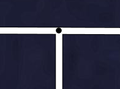 تقاطعی ساده و معتبر (نقطهٔ سیاه وسط جزئی از هر دو راه سفید است)
 -
 تقاطعی که نادرست رسم شده است


پلها

bridge=yes و layer=1 میگیرد.پل با راه جداگانه رسم میشود. این یکی از وضعیتهایی است که جاده با فقط یک راه رسم نمیشود، بلکه چندین راه که سربهسر به هم وصل میشوند جاده را تشکیل میدهند و هر کدام از این راهها نیز تگهای متفاوتی دارند. برای این منظور، در ویرایشگرها بهآسانی میتوانید راهها را در گره موردنظر به دو نیم تقسیم کنید.
تگ highway و تگ name به همهٔ قسمتها داده میشود. راه کوتاهی که پل را مشخص میکند، تگهای bridge=yes و layer=x را نیز میگیرد. x عدد لایهٔ پل است و باید یکی بیشتر از لایهٔ راه زیرین باشد (یا اگر راه زیرین شمارهٔ لایه نداشت برابر با 1 است).
اغلب، پل مستقیماً به تقاطع وصل نمیشود. در این صورت باید با جادهٔ کوتاهی پل و تقاطع را به هم وصل کنید (تصویر را ببینید):

برای جزئیات بیشتر Key:bridge را ببینید.
تگگذاری محوطهها
محوطهها راههای بسته هستند
On some occasions the feature you wish to tag is not represented by a line (as is the case of a road, river, rail line etc), but by an area. For instance a wooded area, a park, or a lake are all Map features which are areas. Create a new closed way which represents the outline of the required area. Annotate this way with the required tagging from the map features page, such as natural=water (for a lake), landuse=forest (for a forest), or leisure=park (for a park), etc.
استفاده از محوطه برای راهها
Most ways are assumed to be areas if they are closed (i.e.--if the way connects back to itself). However, there are some exceptions to this, such as highways, which are generally assumed to be ways. If the highway is meant to be an area (for example, a pedestrian square), then an area=yes tag should also be added, to imply that this feature is not just representing the way that forms the border, but the area within it, too.
Areas and Ways Sharing Nodes
There is not clear consensus yet on how to draw areas adjacent to ways. They may be drawn either by leaving a small gap between the area and the way or by connecting them so that the area shares nodes with the way. That being said, when the way is a highway, it usually is most accurate to include a gap, so that the area ends by the side of the road and does not share nodes with the road's way. This is because highway ways usually are traced along the centerline of the road, and it is unlikely that the area being tagged actually extends to the center of the road.
دقت
- See main article: Accuracy
Accuracy is important during mapping. Beware of systematic errors of aerial imagery (see for example Bing#Precision). Remember, that when tracing roads — particularly winding, rural ones — you should add enough points to make each curve look like a curve. Of course, this is entirely subjective, as curves made entirely of lines will only ever approximate a "true" curve (which has an infinite number of nodes), and will always look like a series of lines when zoomed in past a certain point no matter how many nodes there are.
To generalize, though, sharp curves (those having a small radius) require many, closely-spaced nodes, while broad, long-radius curves can consist of fewer nodes having more distance between them. Without a hard-and-fast rule, it is best said to simply use good judgement and strive to seek a balance.
Small example using GPS traces
Below there is an example of a very roughly-traced rural 2-kilometer road. It's rather crude, particularly on the sharp curves. We would normally expect mappers to represent this kind of road with more nodes than that.

This is the same 2-kilometer road - but this will look much better on the map, and gives the map user a better sense of the curves of the road. You can see the road on the map. You can see, that ... other mapping services] have a similar degree of accuracy.

Note: Keep in mind that the road in the diagram below is about 2 km long. For very short roads you do not need to add that many nodes. If a road is perfectly straight then a node at either end is always sufficient, regardless of how long it is.
It's easy enough to "fix" these things i.e. enhance the detail of the road. Normally you should just add more nodes to the existing way. If you choose to delete and redraw a whole road, check that the nodes don't themselves have tags e.g. a highway=crossing node. Potlatch and JOSM] will highlight tagged nodes.
تاریخ و ساعت
تعریف ساده
تاریخ باید در قالب ISO 8601 باشد، یعنی YYYY-MM-DD.
تگنویسی دقیق
- Key:opening_hours#Examples or more complex and precise Key:opening hours/specification
- Category:Time data standards contain overview of all tags involved in specifying time
متفرقه
- Intersections and interchanges - These are most likely to be always improved by someone else, no matter how much detail you put in
- The initial level of detail should include correct connections from/to each road and link road and the existence of any bridges and underpasses; remember to set oneway tags where applicable.
- For intersections any pedestrian crossings are valuable information; add a node in the way they cross at their location
- After that there's still lots of detail that can be added (as with all roads: number of lanes, speed limits,
lit=yes/no
- Accuracy. How do you judge and or indicate the accuracy? How accurate is good enough? Is a rough approximation better than nothing (i.e. inaccurate roads get refined the way wikipedia articles do).
- A GPS trace is almost always more accurate than other sources available to us. Still several, even tens of traces can be used to improve the accuracy. Do note though:
- Sometimes and in some environments the GPS trace can wander off to some direction (often 15-30 meters but even 90 meters); compare the trace with your memory, photos and notes to see if straight roads appear as a reasonably straight set of trace points.
- If it's a new road (nothing previously entered in the area) and there aren't any aerial images available, draw it in anyway
- If there are already other roads around and your trace seems bad, try to deduce the "real" form from the trace by not crossing roads that don't intersect with the road you traced.
- How accurate is good enough varies with each user:
- For most uses it's accurate enough when it's not misleading: say when a cycleway drawn on the map
- shows all correct bends and intersections
- and no nonexistent ones
- and is on the right side of the nearby road / stream / railway
- and is roughly the correct distance away from those features (some editors have support for measuring distances)
- Some may later want to draw fences, hedges and walls around the houses (where they exist); they will have mapped their locations to within a few meters by repeated traces and considerable amount of deducing and aligning things in lines
- For most uses it's accurate enough when it's not misleading: say when a cycleway drawn on the map
- Not only inaccurate roads, but those lacking secondary information, are refined later anyway. When contemplating on whether to approximate some road, try to consider if a user would find any value in the approximated form - is it likely to be within, say, 50 meters from the real location at all times (in otherwise unmapped territory)? If you approximate, do add a
source=approximationor similar tag to the way.
- A GPS trace is almost always more accurate than other sources available to us. Still several, even tens of traces can be used to improve the accuracy. Do note though:
- Is it constructive/helpful to mark a road that you know is roughly in the right place but don't have any supporting GPS data?
- This depends again on what else is there:
- If an urban road is missing in a rectangular grid and you confirmed its existence and it was, say, roughly halfway between the parallel roads: the position is likely to be almost as good as the position of those parallel streets when you draw it in.
- If the missing road ventures into the unmapped territory winding along the way, it's likely better to draw just a stub for the starting point and add a
FIXME=continueon the last node. If one were to draw the full way freehand, it would very likely be too short/stretched/skewed - unless there are good aerial images available.
- This depends again on what else is there:
- Landmarks, footpaths, etc.?
- How do you indicate that one road passes over or under another? - See the description for bridges above, and Key:bridge.
- If a road is made up of several/many ways, all ways should carry the name and/or ref tags.
توپولوژی
- اهمیت توپولوژی صحیح از دقت مکانی بیشتر است یا کمتر؟
- در نهایت هردو مهم هستند و تناقضی با هم ندارند اما زمانی که ابزارهای ما در تعیین توپولوژی به همان میزان موقعیت، دقیق باشند بایستی درست کشیده شوند، حتی اگر منجر به این شود که بعضی تقطهها چند متر جابجا باشند.
- اگر جادهای دو بانده است حتماً بایستی دو جاده جدا کشیده شود مانند بلوارها
- اگر جادهای دارای جزیره ترافیکی باشد (مانند جاهایی که به میدان نزدیک میشود) بایستی به صورت مثلث کشیده شود یا نه؟ چقدر بزرگ باید باشد تا ترسیم شود؟
- هم میتوانید رسم کنید و هم میتوانید رسم نکنید. محدودیتی وجود ندارد. ولی طبیعتا هر چه طول مسیر جدایی بیشتر باشد، احتمال اینکه کسی اقدام به رسم جداگانه مسیرها بکشد بیشتر میشود.
هشدار: OpenStreetMap بسیار اعتیادآور است. هر از چندگاه استراحت کنید، خیلی چیزها برای انجام دادن هست.
- ↑ In the language of toponomastics, the toponym “Ho Chi Minh City” consists of the specific “Ho Chi Minh” and the generic “City”. Both the specific and the generic are legitimately part of the toponym.
- ↑ Tagging mailing list thread on name tags for internal features of a named area
- ↑ Inventing names for essentially unnamed private airstrips
- ↑ https://lists.openstreetmap.org/pipermail/tagging/2020-December/057727.html
- ↑ Depending on the exact rules you follow and if Alte Brücke (old bridge) is the proper name of a locality, or just a description. An der Alten Brücke would never be wrong, but don’t correct An der alten Brücke if it could also be right.
- ↑ https://www.duden.de/sprachwissen/rechtschreibregeln/Gro%C3%9F-%20und%20Kleinschreibung#D88
- ↑ A new tag is proposed to explain why it doesn't have a name.
- ↑ For example, this is a single shop that calls itself "Fun House" in front where customers park but "Flag House" in the rear where customers enter.
- ↑ 9.0 9.1 conforming to BCP 47 standard. Deprecated:
ko_rm